
A multi-delimiter pattern contains different types of delimiters in a pattern, such as an underscore, colon, and comma. Structure compliance determines how and when extractions take place. With a single delimiter pattern, an extraction occurs only for dimension values that adhere to the pattern’s exact structure. For example, dimensions that have the same number of positions as the dimension that you’re currently creating this pattern for. When working with multi-delimiter patterns, the logic is different.
Structure Compliant
When Structure-Compliant is toggled on, any dimensional value to which the pattern is applied is compared to the pattern’s structure for an exact match. With multi-delimiter patterns, an exact match occurs when a given dimension value and the applied pattern use the exact same type, quantity, and order of delimiters.
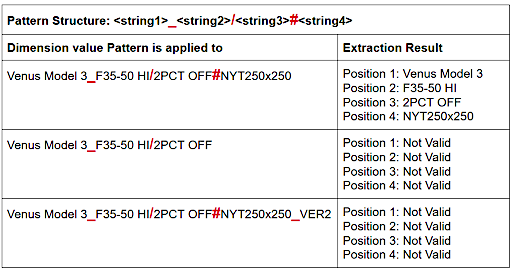
This table describes what happens when a pattern structure is applied to the specified dimensions and its results. The delimiters are in red. An extraction occurs only when there’s an exact match between the pattern structure and the structure of the given dimension value. Any difference in the structure is considered invalid, so no extractions occur.
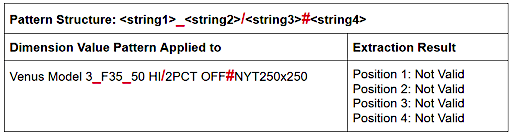
In addition, there’s a sensitivity to whether extraction results are allowed to contain delimiter values. If an extraction result contains one of the delimiters, it’s considered invalid. In this example, because the second position extracts “35_50 HI,” which contains one of the defined delimiters, the entire extraction is invalid.
Non-Structure Compliant
When Structure-Compliant is toggled off, a dimension value doesn’t have to match the applied pattern’s structure in its entirety, from the first delimiter to the last. It follows the pattern structure up until the extracted position. In the examples, although the dimension values don’t follow the entire pattern structure from start to end, the values do follow it up until the extracted position. Extractions up until this point are executed.
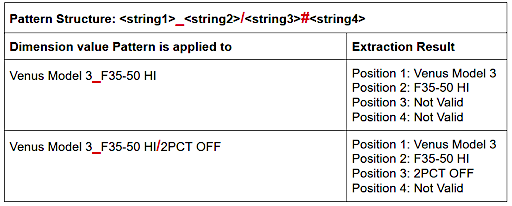
If the next delimiter in line is missing, the entire string that appears after the existing delimiter is extracted as is and is attributed to the next position. In these examples, the second delimiter (/) pertaining to position number 2 is missing. Everything that appears after the first delimiter (_) is extracted and is attributed to position number 2.
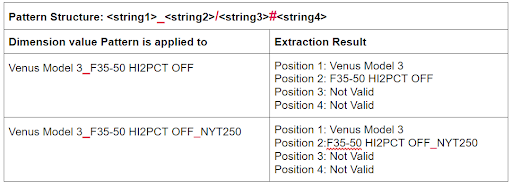
If a position before the current extraction contains delimiters, the current extraction is considered invalid. In these examples, there are no delimiters in any positions that come before positions 1 and 2. Therefore, the extractions pertaining to these two positions are executed. Extractions from position 3 and onward are considered invalid because they contain delimiters.
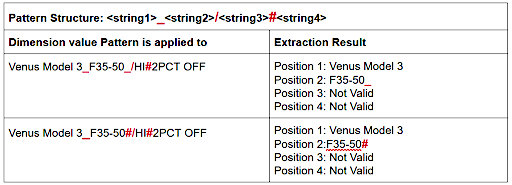
The extraction result for position 2 contains a delimiter. Extraction results are only sensitive to delimiters if they appear in positions before the current extraction. Delimiters that appear within the current extraction itself are considered valid, so the extraction is executed.
The string value that appears in the last position is extracted as is regardless of its contents, with or without delimiters.