
After enabling sandbox, the sandbox icon is available in the top right.
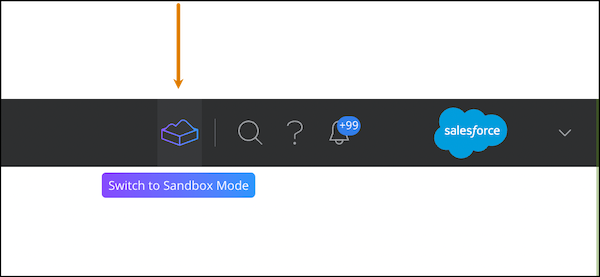
When you’re in sandbox mode, the screen has a purple background so that you can easily distinguish between your production and sandbox environments.

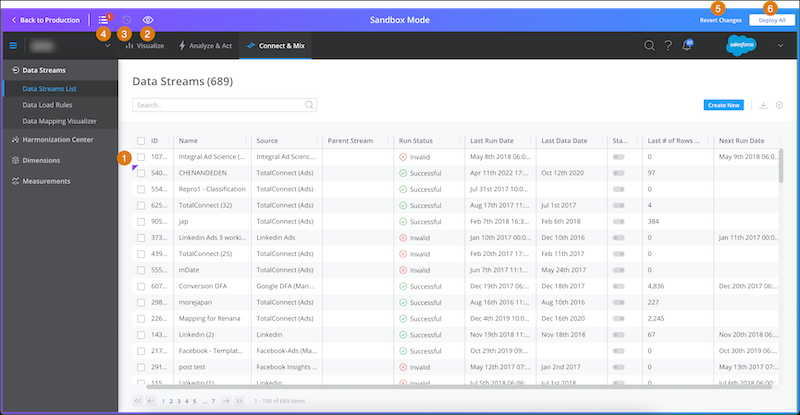
Each entity that has been created, edited, or deleted in sandbox mode is marked with a purple triangle (1).
Click Show Only Sandbox Entities (2) to see only sandbox entities in your list.
Click Show Deployment History (3) to see the history of the entities deployed from sandbox to production.
The Sandbox Management Center (4) shows all your sandbox entities in one location.
You can revert changes (5) you made in sandbox mode.
Click Deploy All (6) to push all changes you made in sandbox mode to production.
- Manage Sandbox Entities in Marketing Cloud Intelligence
Because sandbox is shared at the workspace level, all admins have access to the same sandbox mode. However, you can choose to let users see only the sandbox entities that they created. - Deploy or Revert Actions in Sandbox Mode in Marketing Cloud Intelligence
In sandbox mode you can deploy or revert changes. - Resolve Dependencies in the Marketing Cloud Intelligence Sandbox
Sometimes an entity is dependent on another entity. For example, if you create a calculated measurement in sandbox that is based on another calculated measurement also created in sandbox, the first measurement is dependent on the second to work correctly. - View Deployment History in the Marketing Cloud Intelligence Sandbox
All your deployment activity is logged and can be viewed in the Sandbox Deployment History dialog.