
After you upload your data with TotalConnect, a preview of your source data lets you see how Marketing Cloud Intelligence reads the raw data, including fields and their types. The table reflects all the fields (columns) from your source file. Each field is defined with a type—text, number, or date—and you change the type if needed. You can also change the date format.
Field Types
Each field is defined with a different type (text, number, or date), and you can change the type if necessary. Click the column name and select the type.
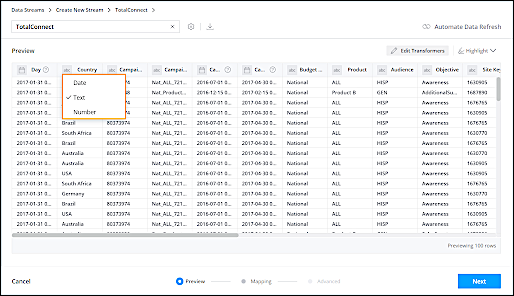
Date Type Fields
When it comes to date type fields, recognizing date formats is of utmost importance regarding data correctness and aggregation. In order to ingest a particular row of data, Marketing Cloud Intelligence must be able to read the date format correctly.
Since there are a variety of different date formats, Marketing Cloud Intelligence automatically recognizes the format that was used in the data source. In some cases, multiple formats are used, therefore more than one format is found.
To change the
date format or add a second date format, click the Day column and then click the Settings icon.
You can select a format from the list or enter a date format. To apply more than two date
formats, use the PARSEDATE() function.
Transformers
Transformers are applied to your source file to create the final data table that is used later when mapping. Four transformers are automatically applied: File, Table, Headers, and Totals. You can add transformers for more advanced file structure manipulations.
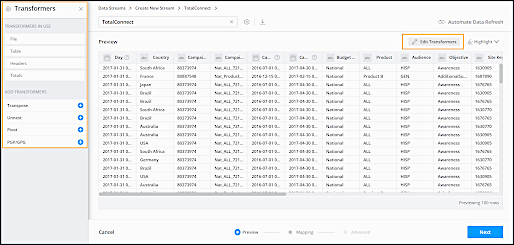
When you apply transformers, you can see how your source data is affected in Preview.
See Transformers in Marketing Cloud Intelligence for more information about what you can do with Transformers.
Highlight Tool
Use the highlight tool to focus on a specific field type. For example, you can highlight all the date columns.
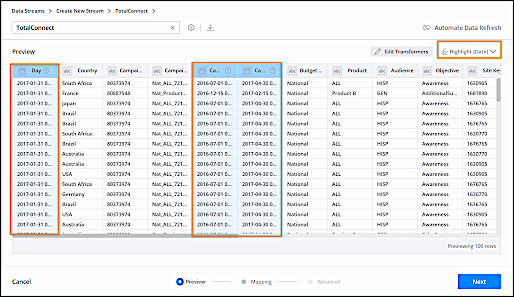
You can highlight date, text, and number fields, as well as columns added by transformers, which create additional columns, like transpose, or unnest.