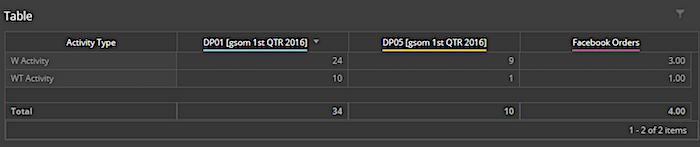
You can harmonize or integrate LiteConnect data streams with other data streams using Vlookup, data fusion, or calculated dimensions. However, LiteConnect data streams are naturally harmonized at the date level, so you can consolidate measurements by date.
Vlookup
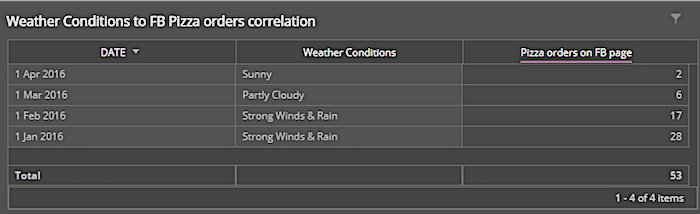
With Vlookup, you can identify like values across data streams to populate one data stream with data from another. For example, a pizza store wants to cross-match its delivery data from Facebook with weather data to see if there’s a correlation. They can run the Vlookup command from the Facebook data stream to find similar dates in the LiteConnect weather data. They can then pull the weather conditions for matching date values. In the mapping of the API data stream, they can use the Strategy entity to house this formula:
VLOOKUP(csv['Facebook Date], [‘Gsom Date’], [‘conditions’],true,false,{'Gsom
                    Weather'})
The pizza store created a widget to display the data.
You can also source Vlookup in LiteConnect. For example, you can include the Vlookup command in a formula in a LiteConnect data stream header to pull data from another data stream.
Data Fusion
Data fusion creates a link between two dimensions from different data stream types based on identical values. You can unify identical campaign values and measurements from different data streams in a single widget. Data fusion is easier to set up than Vlookup. It’s more appropriate for unifying measurements from different data streams rather than pulling dimension values, which is done using Vlookup.
For example, you have a LiteConnect data stream with survey data, and you want to match identical values in a Facebook API data stream. You can then create a widget with the survey figures from LiteConnect and the delivery figures from Facebook.
Calculated Dimensions
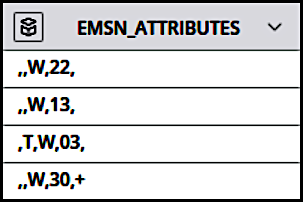
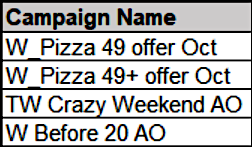
Use calculated dimensions for multiple data source unification. For example, let’s use the Vlookup weather data and Facebook delivery data. If a calculated dimension is conditioned on the presence of W or T in either dimension and assigns a new value accordingly, one value is created that is true for both sources and unifies them.
Dimension from weather data:
Dimension from Facebook delivery data:
Here’s an example of a calculated dimension based on this principle:
if([EMSN_ATTRIBUTES] contains 'W' && [EMSN_] contains 'T')
{
return 'WT Activity';
}
else
{
     if([Campaign_Name] contains 'W' && [Campaign_Name] contains 'T')
     {
     return 'WT Activity';
     }
     else
     {
     return 'W Activity';
     }
}
When viewing this calculated dimension in a widget, you can see metrics for either source per calculated dimension.