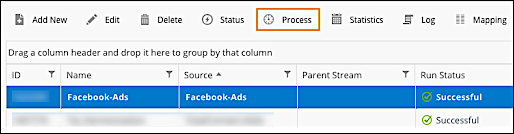
Re-process is a common action that updates the data within a selected data stream. The
most popular use for Re-process is when a dataset changes on the platform’s side, such as
Facebook, and the user wants to pull the update back to Marketing Cloud Intelligence. This action proactively pulls
the new data instead of waiting for a scheduled update to take place (if applicable).
Required Editions
| User Permissions Needed |
| To edit a data stream: |
Admin |
-
Navigate to the Connect & Mix tab.
-
Expand Data Streams, and then expand Data Streams
List.
-
Select the data stream from the list, and from the top toolbar, click
Process to open the Process Data dialog.
-
Select the relevant date ranges for the data that you’re reprocessing.
-
To process data for days that the data steam failed, select Process Data Stream
Failed Days.
-
Click Process. New data is retrieved for the specified date range,
including failed retrievals.