Prioritize your data stream processing tasks by organizing them in the queue based on
priority. Place the task at the top of the queue for the highest priority. Priority is allocated
based on the placement of the tasks in the queue.
Required Editions
| User Permissions Needed |
| To prioritize a task: |
Admin |
-
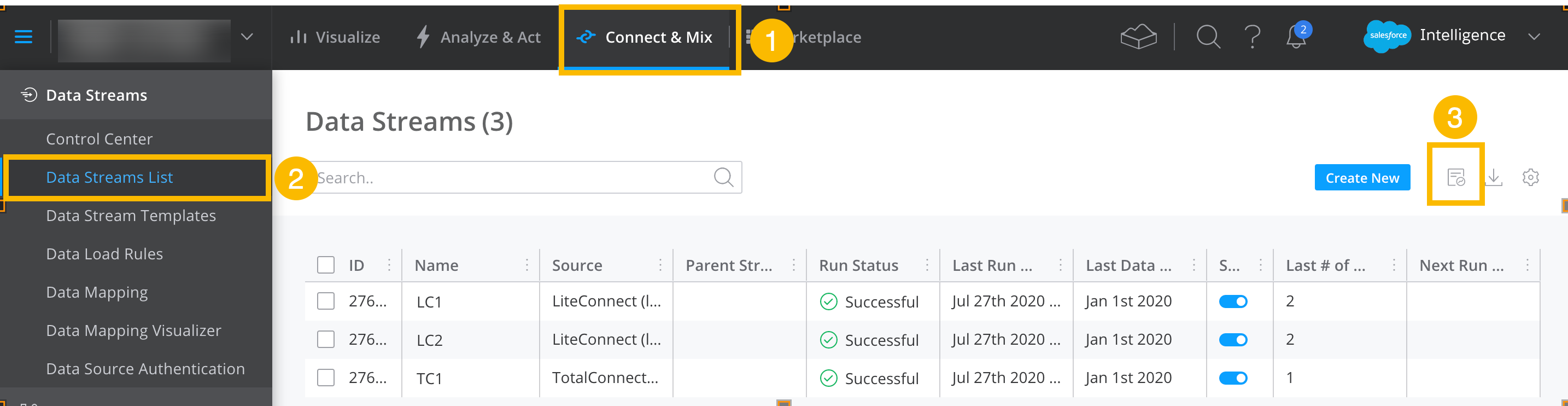
On the Connect & Mix tab (1), from the Data Stream List window (2), click the
Processing Queue icon (3).
-
Click the reorder icon, drag the task to the top of the queue for the highest priority, or
lower down on the queue based on the task's priority, and then click
Save.
-
To view all the data streams being processed and their progress in your task, click the
expand icon on a task tile.
-
To remove a specific data stream from a task, expand the task tile, hover over the stream,
and click the remove icon.
-
To cancel a task, click the settings icon on the task tile and then click Cancel
Task.
-
Completed tasks remain in the queue for a while and then disappear so that you can see the
current tasks in progress.