
On the mapping page, you can see all the fields that were mapped and unmapped in your data stream.
Required Editions
| User Permissions Needed | |
|---|---|
| To map source fields to Marketing Cloud Intelligence fields: | Admin |
- Create a data stream or edit an existing one.
- At the bottom of the Data Stream page, click Map to Model.
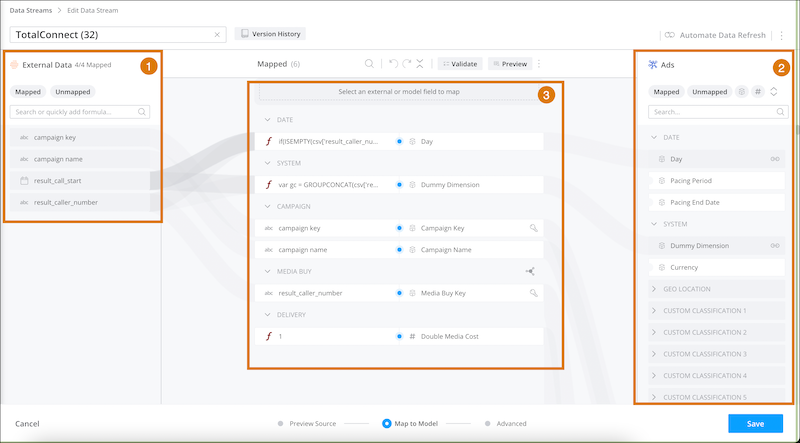
The Mapping page shows the source fields in the external data (1) and the Marketing Cloud Intelligence data model fields available for mapping (2). These fields are based on the data stream type, which is assigned automatically after you upload your data. The data steam type determines which dimensions and measurements are available for mapping. You can see all the connections made between the external source and an Intelligence field (3). New fields only display in TotalConnect data streams.
- Fields in orange represent new fields that were found when your data stream was processed.
- To view a field’s original name and the date that it was added, hover over the name. For example, if the field was added 3 weeks ago, you can reprocess data only for the past 3 weeks.
- If you’re working with an API data stream connected to more than one data stream type, toggle between the mapping to view or modify it.