
You can customize an existing data model field.
Required Editions
| User Permissions Needed | |
|---|---|
| To customize a field: | Admin |
- Navigate to the Connect & Mix tab.
- Expand Data Streams, and then expand Data Streams List.
- Create a data stream or edit an existing one.
- At the bottom of the Data Stream page, click Map to Model.
-
Select a field.
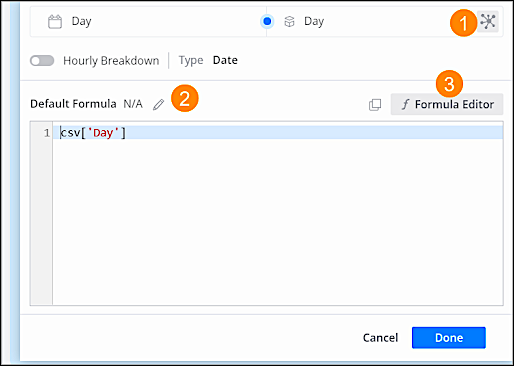
To change the properties, click Model Field Properties (1). To add or edit a formula, click Edit (2). To use more advanced functions, click Formula Editor (3).
If you customize a key field and it's already mapped, you may still see the old key in the platform. To delete the old key, use one of these methods:
- If the data comes from a data-stream level data stream (Ads, Conversion Tag, and so on) you must recreate the data stream, or delete the key via the Dimension Explorer. For more information, see Re-run and Recreate Data Streams or Use the Dimension Explorer to Explore and Fix Data Issues.
- If the data comes from a workspace-level data stream (CRM, ecommerce, and so on) the only way to delete the key is via the Dimension Explorer. For more information, see Use the Dimension Explorer to Explore and Fix Data Issues.