
If you want to add new data alongside the old data, use the incremental data load mode. With this mode, the new file supplements the old measurement data.
Use the Incremental data load mode only for certain use cases. Before selecting the Incremental mode, consult your account manager.
These tables show what happens when using Incremental mode.
Existing data

Uploaded file

The blue cells indicate data that differs from the existing data.
After Incremental mode is applied
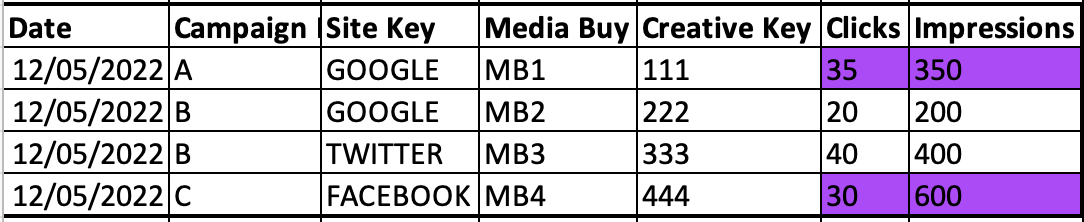
The purple cells indicate incremented data.
For the existing main entity keys, the measurement data is incremented to the values included in the uploaded file. For example, the measurement values for media buy keys MB1 and MB3 were incremented, even though the number of impressions for MB3 hadn’t changed. The main entity key, MB4, was also inserted.
To determine whether to increment or insert a row, these items are considered:
- Data’s date
- Main entity key
- Entities that are linked to the main entity key in a many-to-many connection