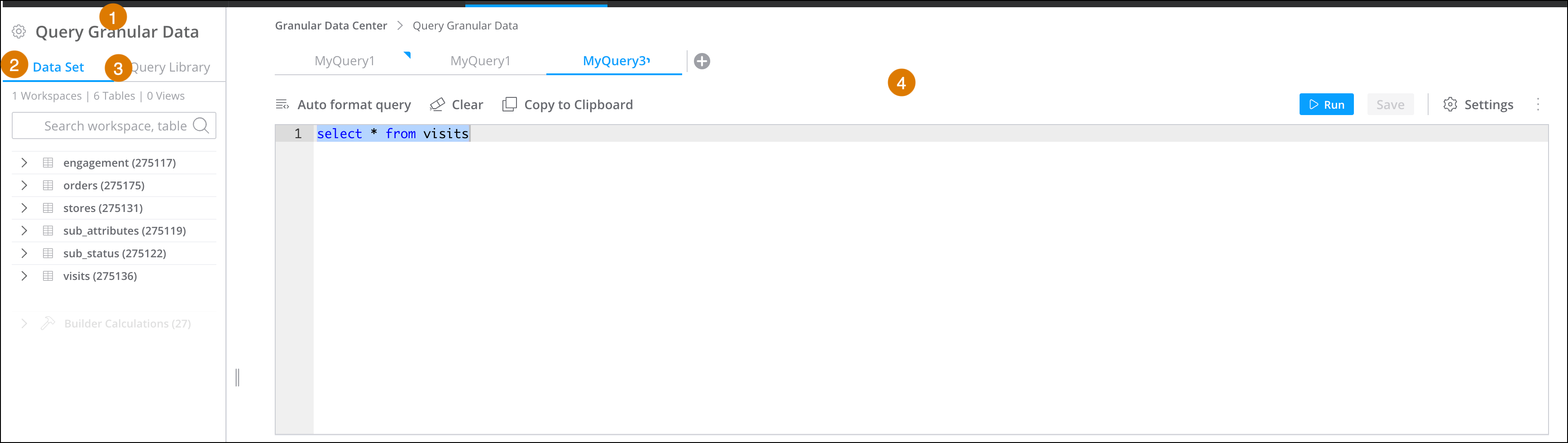
All saved queries appear in the Query Granular Data dialog. Here you can view, edit, and
even create queries.
Required Editions
| User Permissions Needed |
| To view Granular Data Center queries: |
Admin |
From the Connect & Mix tab, select Granular Data
Center , and then Query Granular Data.
|
Query Granular Data
|
|
(1) This tab shows your saved queries and tables. To view the dimensions and
measurements, expand a table. |
| |
Data Set
|
(2) View information about the dataset including the number of workspaces, tables,
and views |
| |
Query Library
|
(3) View all your saved queries and views. If you want to edit a query or reuse it,
double-click the query name and it appears in a new tab in the editor. |
|
Query Editor
|
|
(4) Create and edit queries. |