
This method allows you to upload files into a TotalConnect data stream by using an FTPS or SFTP connection. Available for TotalConnect Data Streams
Required Editions
| User Permissions Needed | |
|---|---|
| To edit a data stream: | Admin |
- Navigate to the Connect & Mix tab.
- Expand Data Streams, and then expand Data Streams List.
- Select the data stream that you want to modify.
-
At the top right-hand corner of the page, click Automate Data
Refresh.
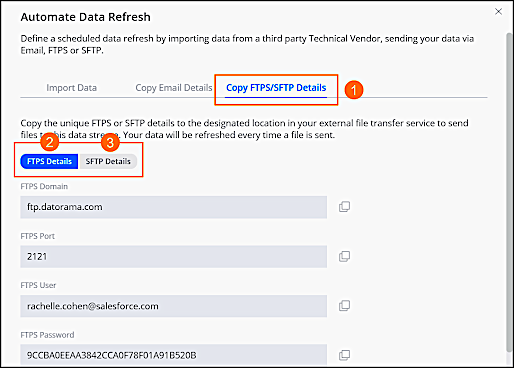
- Click Copy FTPS/SFTP Details.
-
Decide if you’re using FTPS or SFTP, and then add the unique details to the designated
location in your external FTPS/FTPS service to send files to this data stream. Your data is
refreshed every time a file is sent.
If you’re using the same FTPS/SFTP client to send multiple files to multiple different data streams in the same workspace, it’s advisable to add a “$” and the data stream’s unique ID after the FTPS/SFTP user. For example, tgornenska@salesforce.com$123456. These additions ensure that your files are sent to the correct data stream in your workspace, because sometimes FTPS/SFTP clients cache your FTPS/SFTP username and password.