
If you’re creating or editing an API connector data stream, you can define the frequency and schedule for refreshing the data stream.
Required Editions
| User Permissions Needed | |
|---|---|
| To edit a data stream: | Admin |
- Navigate to the Connect & Mix tab.
- Expand Data Streams, and then expand Data Streams List.
- Select the data stream that you want to modify and click the edit icon.
-
Click edit in the Automate Data Refreshwindow.
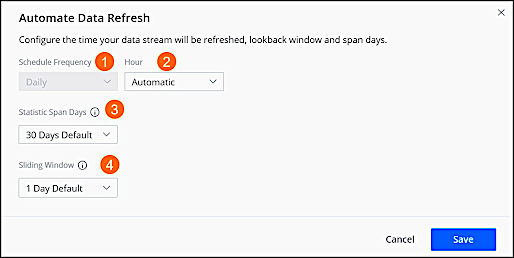
- To determine when the data stream refreshes, select the frequency from the Schedule Frequency dropdown.
- To determine the time the data stream refreshes, select the Hour from the dropdown.
- To define the number of days that you want to allow for span days, select the Statistic Span Days from the dropdown. For example, you select 10 days and your sliding window is defined for 30 days. When you run the report, you see three different files, each showing 10 days.
- To define the number of days back that you want to retrieve data whenever the data stream is processed, starting from yesterday, select the Sliding Window from the dropdown.
- To disable data refresh for a stream, select the stream, and disable the stream in the status.