When you query entities from different data types with different measurements that are
unlinked in the platform, unrelated measurements appear in your report. For example, a report
pulling Ads data— Impressions and a measurement that isn’t in the Ads data type—visits, results in
unrelated measurements in your report.
Required Editions
| User Permissions Needed |
| To create and manage data reports: |
Admin or Power User |
There are two ways to show unrelated measurement data in your report:
- Show unrelated measurements on default entity—shows the unrelated measurements’ total values
in a default entity of the dimension.
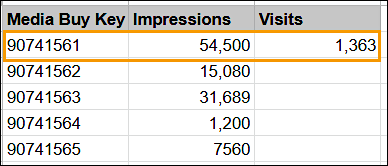
- Duplicate unrelated measurements across rows—shows the unrelated measurements’ total values
in each row of the report.
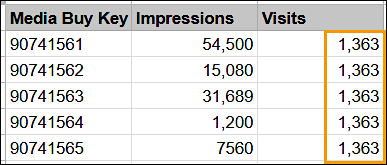
-
On the Analyze & Act tab, in the left menu, select
Reports.
-
Select the report, and click edit.
-
Scroll down, and expand Advanced Sheet "Sheet 1" Settings.
-
Select the display methods from the Unrelated Measurement dropdown.
-
Save your report.
