
After you create your insights bots you can view and review the insights that are available.
Required Editions
| User Permissions Needed | |
|---|---|
| To create Insights bots | Admin or Power User |
- From the Analyze & Act tab, on the left, click Einstein Marketing Insights.
- From the Insights Bots screen you can see the bots in your workspace. Each bot shows a data summary.
- To group your bots by KPI, toggle Group by KPI. This view separates your bots based on matching KPIs. For example, see all the bots that track bounce rate.
- To learn more about a bot, click it and review the four sections.
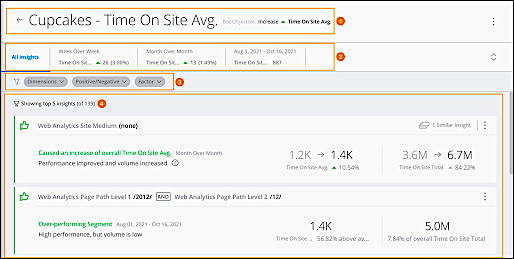
- The bot name and objective (1).
- What changed and a quick view of the insights for: Week over Week (WoW), Month over Month (MoM), and overall change (2).
- To narrow the insights, use the filters bar (3).
- View a list of Bot insights, ordered by EMI’s evaluation of most valuable insights. Each insight includes detailed information (4).
- To learn more about an insight, click it. You can see a detailed breakdown of the KPI and the components leading to positive or negative impact. And you can see comparisons of similar campaigns.