
Promotion templates determine promotion configuration. Use promotion templates to define stage names, the stages at which advocates and their referred parties are rewarded, and the activities that trigger rewards. Every promotion uses a promotion template. Before creating a promotion, decide whether to use an existing template or create a unique one.
Required Editions
| Available in: Lightning Experience |
| Available in: Enterprise, Performance, Unlimited, and Developer Editions with Referral Marketing |
| Available in: Enterprise, Performance, and Unlimited Editions with Partner Ecosystem Management - Members or Partner Ecosystem Management - Login. Learn more about Referral Marketing with Partner Ecosystem management. |
Default Promotion Template
B2B Referral Management provides a promotion template by default: Refer a Lead. This template isn't available for channel managers to view or customize. Here's how the Refer a Lead promotion template is configured:
| Stage Name | What Happens At This Stage |
|---|---|
| Promotion Launched | Advocates are invited to join the promotion. |
| Advocate Joins Promotion | Advocates join the promotion. |
| Advocate Submits Referral | Advocates refer a business. |
| Referral Qualifies | The referral qualifies as a potential business customer. |
| Referral Closure/Converts | The referral completes the eligible activity or converts to an opportunity and both the advocate and referred party are rewarded. |
Promotions that use the Refer a Lead template reward both advocates and their referred party. Advocates and referred parties are rewarded when the opportunity is closed or won.
Custom Promotion Templates
From the Promotion Templates related list on a referral program, you can view the promotion templates already created. If none of the promotion templates work for your promotion, you can go ahead and create a promotion template. After you create a promotion template, other channel managers and you can reuse the template to create similar promotions.
Here are a few advantages of creating a promotion template:
- Change the stage names as per the needs of your promotion.
- Choose whether you want to reward both advocates and their referred parties, either, or none of them.
- Select the activity that advocates and their referred parties get rewards for.
- Add extended rewards such as payout commission for advocates and referrals.
You can reward advocates and their referred party only one time each in the promotion's journey.
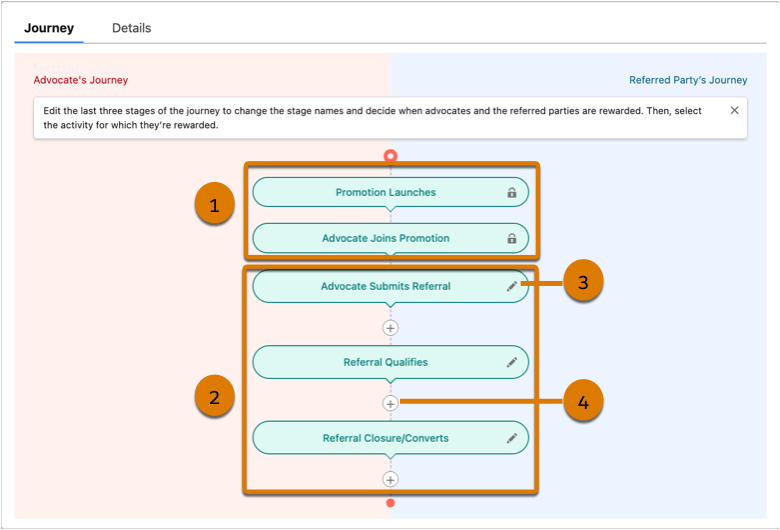
| Callout | Stage Name | What You Can Customize |
|---|---|---|
| 1 | Promotion Launched | These stages are locked. |
| Advocate Joins Promotion | ||
| 2 | Advocate Submits Referral | You can update the stage names and decide the stages at which advocates and their referred parties are rewarded, and the activities for which they’re rewarded. |
| Referral Qualifies | ||
| Referral Closure/Converts |
| Callout | Action |
|---|---|
| 3 | Edit the names of the third, fourth, and fifth stages. |
| 4 | Decide the stage at which advocates and their referred party are rewarded. |
Here's how the last three stages are designed in most referral promotions:
- Third stage—Advocates refer a business and a lead account is created for the referred party.
- Fourth stage—Referred party qualifies as a potential business customer.
- Fifth stage— The opportunity is closed or won.
The specific ways referred parties engage with your company will differ based on your industry and brand requirements. In software industry, the journey can close when the referred party signs a service agreement, completes their initial onboarding, or makes their first subscription payment.
Every promotion template consists of five stages and you can add a sixth stage.
