
Lists person accounts that fulfill a specified role for the selected account. For example, a person account can have a member relationship to a household account. The relationship (association type) is account-contact relationship, where the contact is a Person Account record.
Required Editions
| Available in: Lightning Experience |
| Available in: Professional, Enterprise, and Unlimited Editions |
| User Permissions Needed | |
|---|---|
| To create an ARC Relationship Graph: |
Financial Services Cloud Extension OR FSC Sales AND Customize Application |
- From Setup, in the Quick Find box, enter Actionable Relationship Center, and then select Actionable Relationship Center.
-
Click New Relationship Graph or edit an existing graph.
 Important The Root Node object must be Account to configure the Member Node.
 - Click the plus icon to add a child node.
-
On the Properties tab, configure the node properties as follows:
Field Name Field Value Object Person Account Relationship Type Many-to-Many Junction Object Account-Contact Relationship Parent Node Lookup Field Account Object Lookup Field Contact 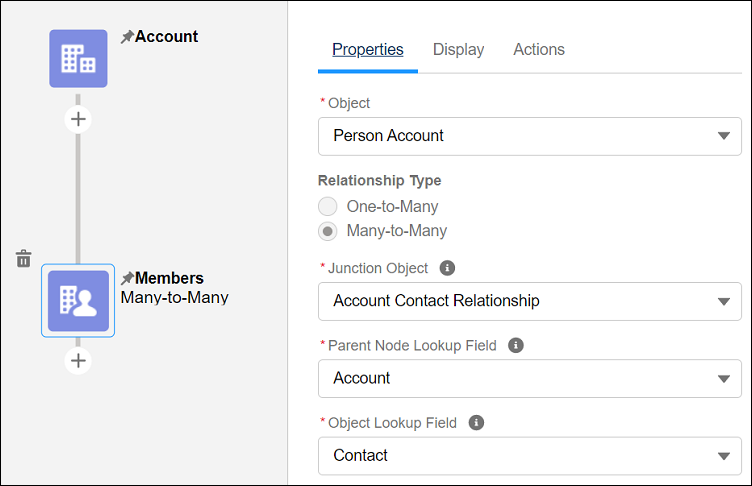
- Click Done. Configure the node Display and Actions tabs.
- Save your graph.