Learn how to use Salesforce objects as data sources in the CRMA runtime.
Required Editions
-
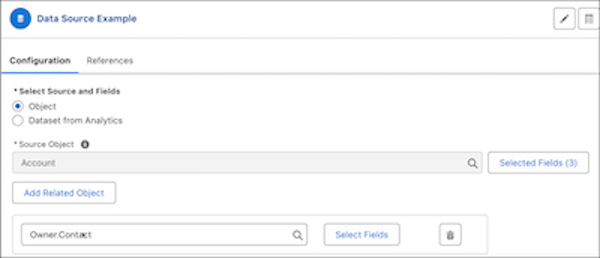
In the Configuration section, select Object as the data
source.
-
In the Source Object field, select an object, and then click Select
Fields to add fields to be used from the source object. The aliases of the
selected fields are automatically filled. The field is then referred to by its alias in
the nodes that reference the field.
-
Click Add Related Object to select a related object and then
click Select Fields to add its fields as data sources.
The objects listed as related objects have a lookup relationship with the data source
object. For related object fields, always specify an alias.
-
Save your node configuration.

 Tip An alternative to adding related objects from a data source in a single Data Source node is to create separate Data Source nodes for each related object. After you've created nodes for all the objects, use Join nodes to join their records using lookup ID fields.
![[Data source node configuration section in CRMA runtime]](https://sf-zdocs-cdn-prod.zoominsoftware.com/tdta-ind-data_processing_engine-264-0-0-production-enus/80e06924-e6c0-4b82-81cf-e99ccd77d857/data_processing_engine/images/dpe_datasource_node.png)