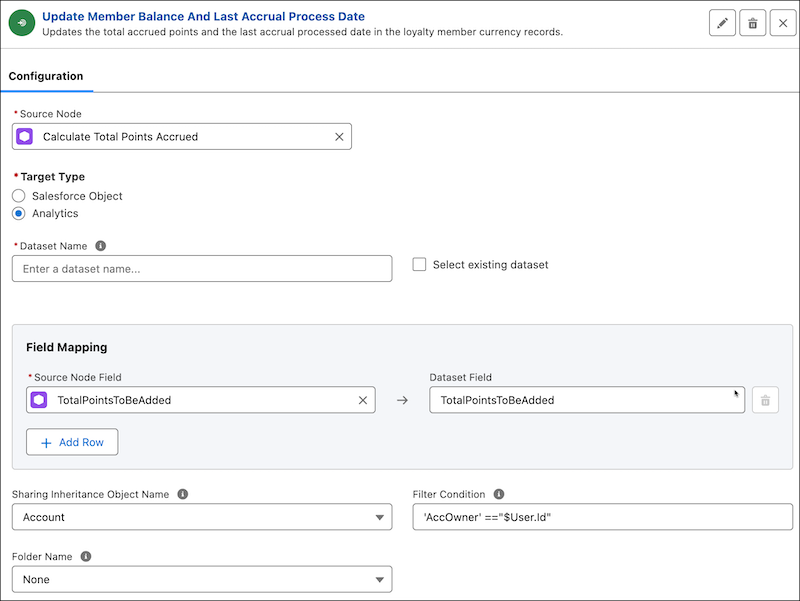
Let's learn how to use Analytics datasets as target writeback objects in the CRMA runtime.
Required Editions
- In the Configuration section, select Analytics as the target type for the source node.
- In Dataset Name, enter a name to create a new dataset or use the Select existing dataset checkbox to choose from a list of existing datasets that you want to overwrite with the transformed data.
-
In the Field Mapping section, map source node fields with target object fields. The
field mappings determine the values to be added to the new or updated target object
records. To delete records from the target object, map the source node field and the
target object field that uniquely identify the records that you want to delete.
To simplify field mapping process, use Einstein generative AI to generate field mapping suggestions. For more information, see Map Related Fields Using Einstein.
- In Sharing Inheritance Object Name, enter the name of the source object from where the row-level sharing inheritance settings are applied from. Make sure that you enable sharing inheritance settings in CRM Analytics.
- In Filter Condition, enter a filter condition that determines who can access the records from the dataset.
- In Folder Name , select the target folder in Analytics where the dataset is stored.
- Save your node configuration.