
Let's learn how to configure Analytics datasets as data sources in the CRMA runtime. You can add a maximum of 200 Analytics datasets as source in the Data Source node of a Data Processing Engine definition.
Required Editions
| View supported editions. |
| User Permissions Needed | |
|---|---|
| To configure a datasource node: | View permissions information. |

Note By default, CRM Analytics replaces blank numeric values with 0. If null measure handling
isn't enabled in CRM Analytics, Data Processing Engine receives 0 instead of null for blank
numeric fields in the dataset, which can affect formula outputs and filter results. Null
measure handling is enabled by default in Salesforce orgs created in Spring '17 and later
and can't be disabled. If your org was created earlier than Spring '17, enable null measure handling in CRM Analytics before
configuring the dataset as a data source. For more information about how CRM Analytics
handles numeric values, see Null Measures in CRM Analytics. To detect and
substitute null values in numeric fields in Data Processing Engine, use the ISNULL, NULLVALUE, or COALESCE formula
functions.
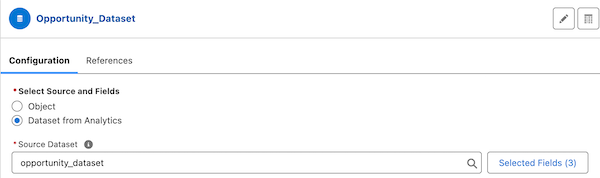
- In the Configuration section, select Dataset from Analytics as the data source.
- Click Source Dataset to select a source dataset, and then click Select Fields to add fields to be used in the source dataset. The aliases of the selected fields are automatically filled. The field is then referred to by its alias in the nodes that reference the field.
- Save your node configuration.
You are now ready to add and configure transformation nodes.