
When you accept a member’s call in the Contact Center, capture the reason for the call and validate the member’s identity.
Required Editions
|
Available in: Lightning Experience Available in: Enterprise and Unlimited Editions with Health Cloud |
| User Permissions Needed | |
|---|---|
| To use the Contact Center for Health Cloud | Manage Contact Center for Health Cloud |
- From the App Launcher, find and click Contact Center.
- From the navigation menu, click Engagement Interactions.
-
Go to the Identity Verification tab.
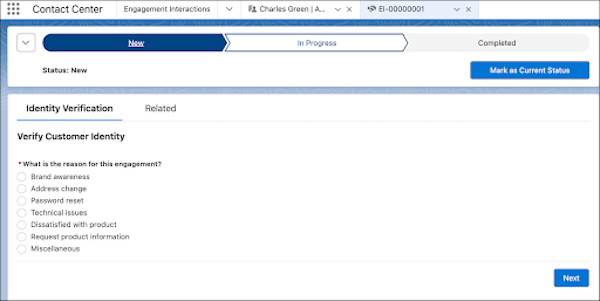
- Select a reason for the interaction.
-
Select who the interaction is about.
 Note If you select Someone Else, enter keywords to search for the user, then click Next. Choose the user from search results and click Next.
 -
Verify the account name and number with the caller. Then, click
 next to the account name
and account number.
next to the account name
and account number.
-
Under Additional Verification Information, verify either the phone number or the postal
code.
After you verify the member’s identity, you automatically view the member’s details in the Contact Center.