To deploy the Industries CPQ in LWC, you must first install and configure IDX Workbench for a new repository.
- Download and install the current version of IDX Workbench, following the steps in
- Create an empty folder (such as IDX workbench) on your computer.
-
In your project folder (such as IDX workbench),
create a folder called vlocity.
The folder must be named vlocity, or the Fetch Datapacks doesn't work in Migrate the Datapacks into Salesforce Org.
- Under Repository, click New Repository and select the folder you created.
-
In IDX, click the configure icon
 to configure the IDX workspace.
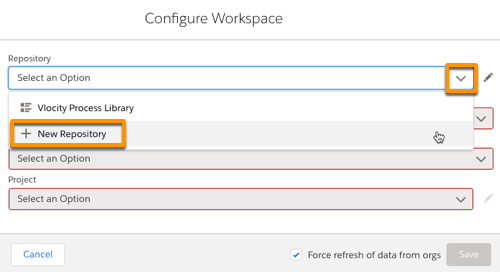
- In the Configure Workspace dialog, click New Repository from the Repository list.
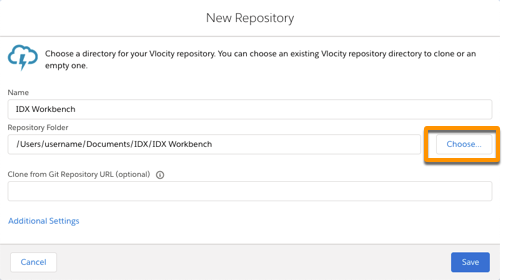
- In the New Repository dialog, click Choose and select the folder you created.
-
Click Save.
The repository for your IDX workspace is set to the new folder.
- Close the Configure Workspace dialog, or click Cancel. Select this new repository and set a new target and project in Migrate the Datapacks into Salesforce Org.