Any order that is in the process of fulfillment is referred to as an In-flight order. Using the Amending In-Flight Orders feature, you can modify your order after you've submitted it. It helps you fine-tune your order before order management completes its fulfillment.
- From the App Launcher, search for Orders and open it.
-
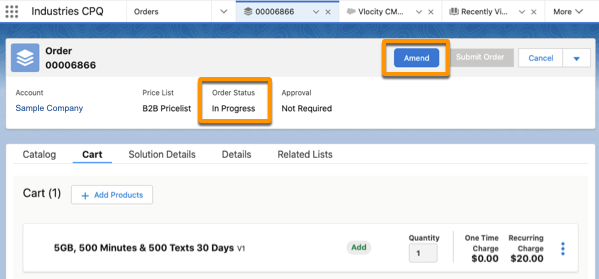
From the orders list, open an order to amend.
The order must be submitted and in the in-progress state.
- In the tab for the order, select Amend from the menu.
-
Add, modify, or delete the cart line items. You can also modify, add, or cancel a promotion and discount that applies to a line item.
You can modify a line item only if it hasn't passed the point of no return (PONR). PONR is a state in the order fulfillment process after which you can't modify an order, including a promotion or discount that applies.
See In-Flight Amendments.
 Note
NoteAfter you complete amending the supplemental order, you can also discard the changes before you submit the order for fulfillment.
To discard the changes you made to the order, from the cart actions, click the arrow and then click Delete. CPQ discards the supplemental order and the original order is activated for order fulfillment. See Order Statuses in CPQ.
-
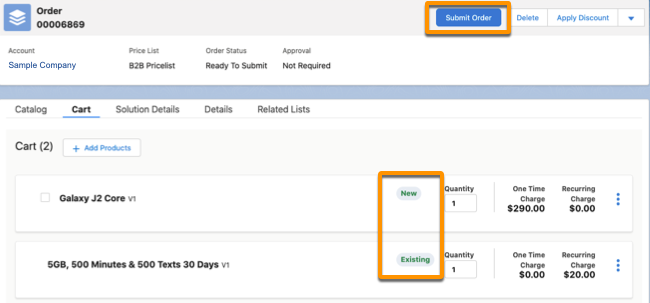
When you complete amending the supplemental order, click Submit Order.
The shows the original carts items with an Existing while, and new items have a New status.
After you submit an amended order, the following status changes occur on the supplemental and the original orders:
-
OM accepts the order: The supplemental order status changes to In-Progress and the original order is superseded.
-
OM rejects the order: The supplemental order is rejected and the original order is activated.
NoteIf the order is a follow-on order, the order is queued until the original order is fulfilled by OM. See In-Flight Amendment: Changing the Default Behavior of a Running Order Item.
-