
Workflow is the lifecycle of a business process and is used in order entry, tasks, customer tasks, customer contracts, contract payments, daily reports, tours, and users.
Required Editions
| Available in: Lightning Experience in Professional, Enterprise, and Unlimited Editions that have Consumer Goods Cloud enabled |
| User Permissions Needed | |
|---|---|
| To create workflows: |
CGCloud Business Admin OR CGCloud Retail Business Admin |
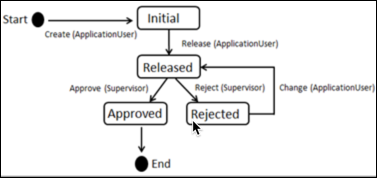
Here’s the workflow of daily reports.
- From App Launcher, find and select Workflows, and then click New.
- Enter a name.
-
Select a
usage:
- Promotion
- Activity
- Customer Tasks
- Daily Reports
- Contract Payments
- Order Entry
- Select a sales org.
- Enter a description for the workflow.
- Save your changes:
- Add a Stage Transition to a Consumer Goods Cloud Workflow
A business object can have various stages. Workflow stages change when a business object changes stage. You can restrict a user from changing the stage of a business object.