---
schema_version: "1"
id: b179a1503f9b4ae88ce9ddf3daa1b2cdf255e3f7b114fcc687f48a225bb31212
title: Create a Consumer Goods Cloud Workflow
collection: admin
version: current
locale: en-us
portal_url: https://docs.salesforce.com/admin/current/en-us/ind/264-0-0/cg_task_admin_create_workflow.md
canonical_url: https://help.salesforce.com/s/articleView?id=ind.cg_task_admin_create_workflow.htm&release=264.0.0&type=5
source_site: help.salesforce.com
content_type: documentation
content_hash: acf7a802a427f35a726755a49beeffc947b3d3c004eb947690ef4c06c7192310
description: Workflow is the lifecycle of a business process and is used in order entry, tasks, customer tasks, customer contracts, contract payments, daily reports, tours, and users.
products:
- Consumer Goods
release: "264"
---
# Create a Consumer Goods Cloud Workflow
Workflow is the lifecycle of a business process and is used in order entry, tasks, customer tasks, customer contracts, contract payments, daily reports, tours, and users.
### Required Editions
Available in: Lightning Experience in Professional, Enterprise, and Unlimited Editions that have Consumer Goods Cloud enabled
User Permissions Needed
To create workflows:
CGCloud Business Admin
OR
CGCloud Retail Business Admin
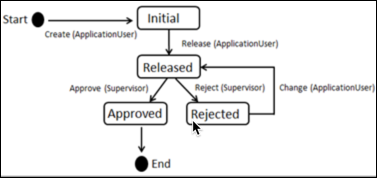
Here’s the workflow of daily reports.
1. From App Launcher, find and select **Workflows**, and then click **New**.
2. Enter a name.
3. Select a usage:
- Promotion
- Activity
- Customer Tasks
- Daily Reports
- Contract Payments
- Order Entry
4. Select a sales org.
5. Enter a description for the workflow.
6. Save your changes:
- **[Add a Stage Transition to a Consumer Goods Cloud Workflow](https://help.salesforce.com/s/articleView?id=ind.cg_task_admin_add_workflow_state_transition.htm&release=264.0.0&type=5)**
A business object can have various stages. Workflow stages change when a business object changes stage. You can restrict a user from changing the stage of a business object.