With Enhanced data model, during offline visits, you can perform advanced actions, such
as offline ordering, penny perfect pricing, and ad-hoc visit creation, based on territories. You
can also perform multimarket segmentation using harmonized master data and manage customers and
products, plan and execute visits, and build processes and hierarchies.
Required Editions
| Available in: Lightning Experience in Enterprise, Professional, and
Unlimited Editions that have Consumer Goods Cloud enabled
|
The image shows the objects within the Consumer Goods Cloud Enhanced data model.
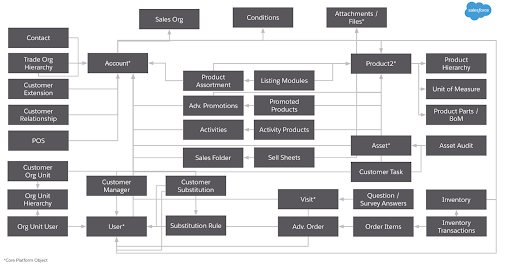
For a complete list of objects and fields in the data model, see the Consumer Goods Cloud guide.
Account, the main object in Enhanced data model, can be linked to other objects in these
ways:
- Directly—for example, Account Manager, POS, Contact, or Account Extensions.
- Indirectly through other objects, such as Asset Audit linked via Asset, Org Unit linked
via Customer Org unit, or Customer Set linked via Customer Set Customer.
The following topics describe the key objects in each functional area of the data model.
- Master Data for Retail Execution
By using master data, you can collect, aggregate, and distribute retail process data consistently. Master Data is required for retail business functions such as order taking, visit management, and activity execution.
- Advanced Promotions for Retail Execution
Target higher revenue and market share for your product through Temporary Price Reductions (TPR), coupons, or in-store displays. The Consumer Goods Cloud app uses special promotions called Sellable Promotions to manage promotions.
- Visit and Advanced Activity Planning and Execution
Set up how field reps plan and execute visits and advanced activities in Retail Execution.
- Advanced Order and Pricing in Retail Execution
Explore advanced order and pricing options through key objects and relationships. With the objects within the Advanced Order and Pricing, you can manage direct and indirect orders, and order types such as standard pre-orders, order samples, or order advertising material.
- Route, Tour, and Warehouse Key Objects
Set up route templates and tour templates, create routes with (warehouse, user, and customer) assignments, and create independent tours or tours from routes by using the Route, Tour, and Warehouse objects.
- Other Retail Execution Key Objects
Review the additional Retail Execution key objects that support account and user tasks, inventory control and order payments, signature capture, conditions, and daily reports.
