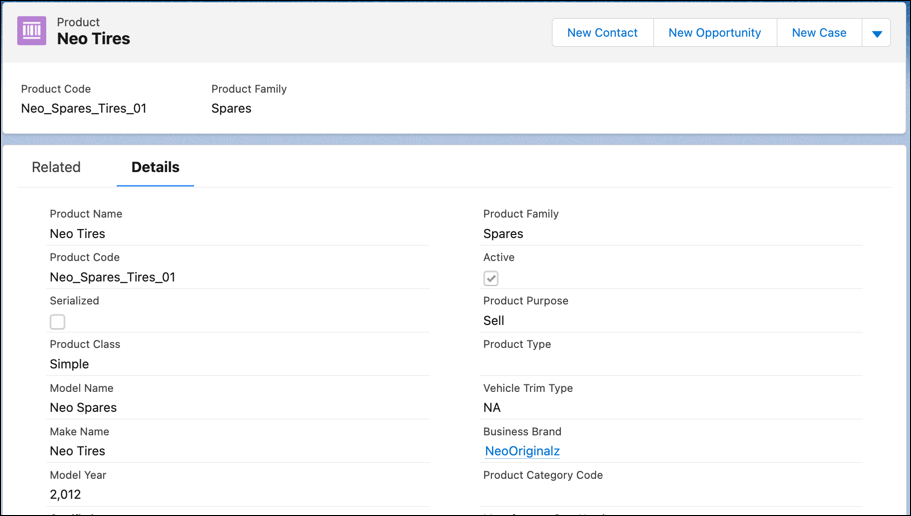
Use Product records to define the parts and accessories for a vehicle. With Automotive Cloud, you can track the key details of a part, such as the part's manufacturer part number, availability and discontinued dates, and other aspects.
Required Editions
| Available in: Enterprise, Unlimited, and Developer Editions. |
| User Permissions Needed | |
|---|---|
| To create Products: | Automotive Foundation User permission set |
Make sure your admin has added the relevant fields to the Product page layout that’s assigned to you.
- From the App Launcher, find and select Products.
- Click New.
- Enter a name for the product.
- For Product Line Code, enter the unique code that identifies the line of products that this part is a part of.
- For Product Category Code, enter the unique code that identifies the category of products that this part is a part of.
- For Manufacturer Short Name, enter the name of the manufacturer who built the part.
- For Manufacturer Part Number, enter the unique number assigned by the manufacturer to identify the part.
-
For Universal Product Code, enter the code available as part of retail product
packaging.
The code consists of two parts, a barcode and a unique 12-digit number.
- For Harmonized System Code, enter the harmonized system code that’s assigned to a part used in the vehicle.
-
For Harmonized Tariff Schedule Code, enter the harmonized tariff schedule code that’s
assigned to a part used in the vehicle.
Harmonized System (HS) is an internationally standardized system of names and numbers to classify traded products.
- For Availability Date, select the date from when the part is used in the vehicle or made available for sale.
- For Discontinued Date, select the date from when the part can’t be sold or used in any vehicle.
- Select the Environmental Protection Regulation Compliant checkbox if the product is compliant with the environmental protection regulations.
- Select the Certified checkbox if the part that’s installed in the vehicle is certified.
- Enter the other details as required, and save your changes.