
To assign a warranty term to a product or product family, create a product warranty term. The standard warranty terms assigned to a product or product family apply to all assets for that product or product family.
Required Editions
| Available in: Enterprise, Unlimited, and Developer Editions |
| User Permissions Needed | |
|---|---|
| To create and update Product Warranty Terms: | Warranty Lifecycle Management permission set |
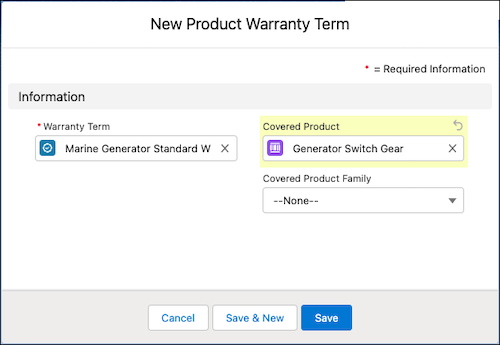
- From a Warranty Term record, on the Product Warranty Terms related list of the Related tab, click New.
- To change the warranty term, specify a Warranty Term.
-
To associate the warranty term with a product or product family, specify the Covered
Product or Covered Product Family.
For each Product Warranty Term record, you can associate a warranty term to either a product or a product family.
-
Save your changes.

Example
The warranty manager at Thomas Railways Equipment, Inc., a manufacturer, defines a warranty term called Pneumatic Drill Standard Warranty. To assign the Pneumatic Drill product and the Underwater Drills family to warranty term, she creates two product warranty terms with the following details:
- Product Warranty Term 1
- Warranty Term: Pneumatic Drill Standard Warranty
- Covered Product: Pneumatic Drill
- Product Warranty Term 2
- Warranty Term: Pneumatic Drill Standard Warranty
- Covered Product Family: Underwater Drills
The warranty term is assigned to all assets for the Pneumatic Drill product and for the products under the Underwater Drills product family.