---
schema_version: "1"
id: bb526ffb4ae47db68ef28da3eb782bae4a28308afa0e2b410b355207e1ebfe52
title: Create a Product Warranty Term
collection: admin
version: current
locale: en-us
portal_url: https://docs.salesforce.com/admin/current/en-us/ind/264-0-0/associate_warranty_term_product_task.md
canonical_url: https://help.salesforce.com/s/articleView?id=ind.associate_warranty_term_product_task.htm&release=264.0.0&type=5
source_site: help.salesforce.com
content_type: documentation
content_hash: 5326de25d73ed3c3f4d328bbb7d425b9320b62e070c0af9f3565f1fe0346d1d9
description: To assign a warranty term to a product or product family, create a product warranty term. The standard warranty terms assigned to a product or product family apply to all assets for that product or product family.
products:
- Manufacturing
release: "264"
---
# Create a Product Warranty Term
To assign a warranty term to a product or product family, create a product warranty term. The standard warranty terms assigned to a product or product family apply to all assets for that product or product family.
### Required Editions
Available in: Enterprise, Unlimited, and Developer Editions
User Permissions Needed
To create and update Product Warranty Terms:
Warranty Lifecycle Management permission set
1. From a Warranty Term record, on the Product Warranty Terms related list of the Related tab, click **New**.
2. To change the warranty term, specify a Warranty Term.
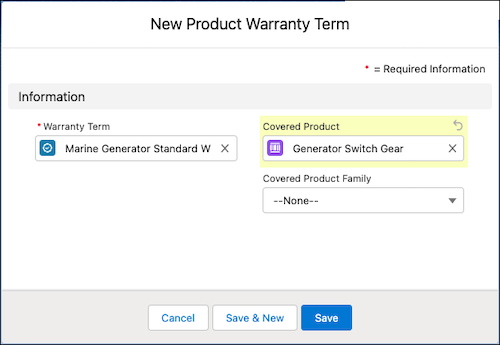
3. To associate the warranty term with a product or product family, specify the Covered Product or Covered Product Family.
For each Product Warranty Term record, you can associate a warranty term to either a product or a product family.
4. Save your changes.

Example
The warranty manager at Thomas Railways Equipment, Inc., a manufacturer, defines a warranty term called Pneumatic Drill Standard Warranty. To assign the Pneumatic Drill product and the Underwater Drills family to warranty term, she creates two product warranty terms with the following details:
- Product Warranty Term 1
- Warranty Term: Pneumatic Drill Standard Warranty
- Covered Product: Pneumatic Drill
- Product Warranty Term 2
- Warranty Term: Pneumatic Drill Standard Warranty
- Covered Product Family: Underwater Drills
The warranty term is assigned to all assets for the Pneumatic Drill product and for the products under the Underwater Drills product family.