
Recalculate forecasts for your account in a single click. During the adjustment period in your Salesforce org, you can recalculate forecasts to view the latest values after multiple users edit the values.
Required Editions

Note
There’s a newer version of forecasting available called Advanced Account Forecasting. Ask your admin about migrating. To learn more, see Maintain Holistic Account Forecasts.
| Available in: Lightning Experience |
| Available in: Enterprise, Unlimited, and Developer Editions |
| User Permissions Needed | |
|---|---|
| To recalculate forecast | Read, Edit permissions on Account Forecasts |
Forecasts are recalculated when you edit the growth metrics, or when you choose to only recalculate based on existing growth metrics.
- Open an account’s record and navigate to the Forecast tab.
-
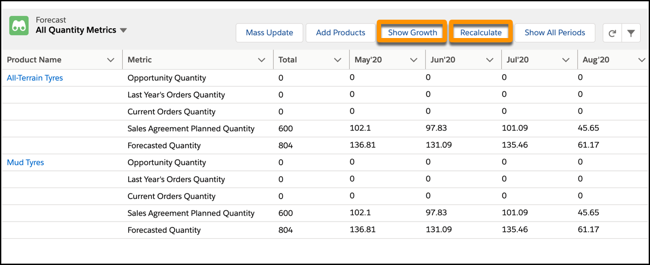
Click Show Growth or Recalculate.
-
If you clicked Show Growth, you can edit the account and market growth percentage values,
and click Apply. If you clicked Recalculate, the process is immediately
triggered with the existing metrics.
Note If an account forecast is being recalculated and you click Recalculate, it will only be recalculated after the in-progress recalculation is completed.The recalculation process derives quantities and revenues from orders, opportunities, and sales agreements. It applies the forecast formula and the updated growth metrics from the last recalculation date and updates the forecast.You receive an in-app notification when the process is complete. To view the latest values, refresh the record.