
Use the Formula Builder on the Account Forecasting page in Setup to create formulas for forecast calculations. You can define your own formulas for quantity and revenue based on sales agreements, orders, opportunities, and account metrics.
Required Editions

There’s a newer version of forecasting available called Advanced Account Forecasting. To learn about how the features are different, review this comparison. For new implementations, use Advanced Account Forecasting. For existing implementations, plan your migration.
| Available in: Lightning Experience |
| Available in: Enterprise, Unlimited, and Developer Editions |
| User Permissions Needed | |
|---|---|
| To create formulas | Customize Application |
You can create complex and sophisticated formulas in the Formula Builder for your unique requirements.. At least one formula for quantity, or revenue is required to cover all periods. If you create formulas for both quantity and revenue for even one period, follow the same pattern for all periods.
- In Setup, search for Account Forecasting in the Quick Find box.
- In Feature Settings, under Manufacturing, select Account Forecasting.
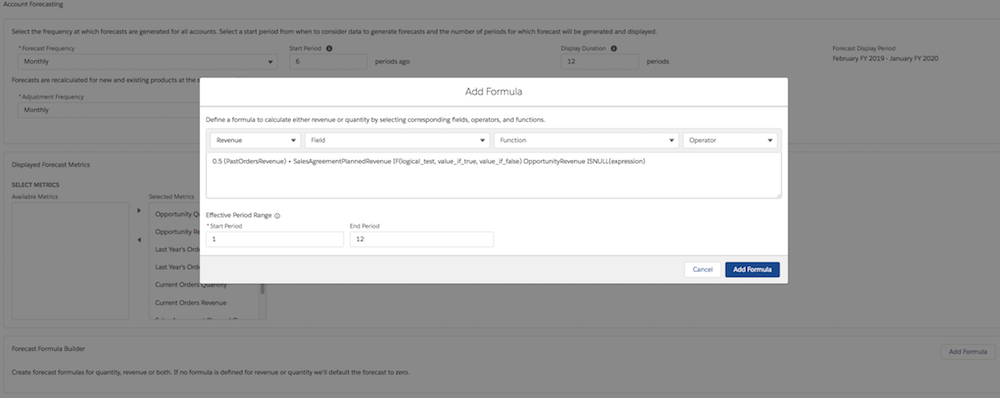
- In the Forecast Formula Builder section, click Add Formula.
-
Select Type as Quantity or Revenue.
For a particular period, if you only create a formula of only one type, the formula for the other type is defaulted to zero.
- To create a formula, use fields, functions, and operators. Pick a field, an operator, and a function in any combination to create a formula in the Compose Formula text box.
-
Enter the start and end period in the Effective Period Range section. For example, if the
formula is applicable for the first three periods, enter 1 as the start period, and 3 as the
end period.
-
Click Add Formula.
Based on the forecast display duration, you can create either a single formula for all periods, or multiple formulas for different period ranges. If the forecast display period is 12 months, you can create up to 12 formulas.