---
schema_version: "1"
id: a5daa3cc6a72f124972da2d6bdb32fac56616306ff6028656a622693f237d75f
title: Build Formulas to Calculate Forecast
collection: admin
version: current
locale: en-us
portal_url: https://docs.salesforce.com/admin/current/en-us/ind/264-0-0/af_admin_formulas_task.md
canonical_url: https://help.salesforce.com/s/articleView?id=ind.af_admin_formulas_task.htm&release=264.0.0&type=5
source_site: help.salesforce.com
content_type: documentation
content_hash: 9bcd9e33c36b8a9892e869c999ec33689de6dfc1068671ef95602ae2f2b510b4
description: Use the Formula Builder on the Account Forecasting page in Setup to create formulas for forecast calculations. You can define your own formulas for quantity and revenue based on sales agreements, orders, opportunities, and account metrics.
products:
- Manufacturing
release: "264"
---
# Build Formulas to Calculate Forecast
Use the Formula Builder on the Account Forecasting page in Setup to create formulas for forecast calculations. You can define your own formulas for quantity and revenue based on sales agreements, orders, opportunities, and account metrics.
### Required Editions

Note
There’s a newer version of forecasting available called Advanced Account Forecasting. To learn about how the features are different, review this [comparison](https://help.salesforce.com/s/articleView?id=ind.aaf_admin_comparison_pictoral_concept.htm&release=264.0.0&type=5 "Compare Account Forecasting and Advanced Account Forecasting to make an informed decision about the feature you want to use for account forecast calculations in your org. We recommend that you enable only one of these features in your org based on your decision."). For new implementations, use [Advanced Account Forecasting](https://help.salesforce.com/s/articleView?id=ind.aaf_admin_parent_concept.htm&release=264.0.0&type=5 "Generate comprehensive, multi-horizon forecasts for sales, operations, inventory, service, and other aspects of your business. Tailor your forecasting configurations to your objectives to generate accurate, relevant forecasts. Generate forecasts based on the data sources of your choice, such as opportunities, orders, and sales agreements, and define sophisticated calculation logic. Help different teams collaborate on forecasts and fine-tune forecasts."). For existing implementations, plan your [migration](https://help.salesforce.com/s/articleView?id=ind.aaf_admin_migrate_af.htm&release=264.0.0&type=5 "You can use Advanced Account Forecasting to generate forecasts based on opportunities, orders, sales agreements, historical orders, and any other custom measures considering all aspects of business from Salesforce and beyond. If you’re an existing customer using Account Forecasting, follow these steps to migrate to Advanced Account Forecasting.").
Available in: Lightning Experience
Available in: Enterprise, Unlimited, and Developer Editions
User Permissions Needed
To create formulas
Customize Application
You can create complex and sophisticated formulas in the Formula Builder for your unique requirements.. At least one formula for quantity, or revenue is required to cover all periods. If you create formulas for both quantity and revenue for even one period, follow the same pattern for all periods.
1. In Setup, search for Account Forecasting in the Quick Find box.
2. In Feature Settings, under Manufacturing, select Account Forecasting.
3. In the Forecast Formula Builder section, click Add Formula.
4. Select Type as Quantity or Revenue.
For a particular period, if you only create a formula of only one type, the formula for the other type is defaulted to zero.
5. To create a formula, use fields, functions, and operators. Pick a field, an operator, and a function in any combination to create a formula in the Compose Formula text box.
6. Enter the start and end period in the Effective Period Range section. For example, if the formula is applicable for the first three periods, enter 1 as the start period, and 3 as the end period.
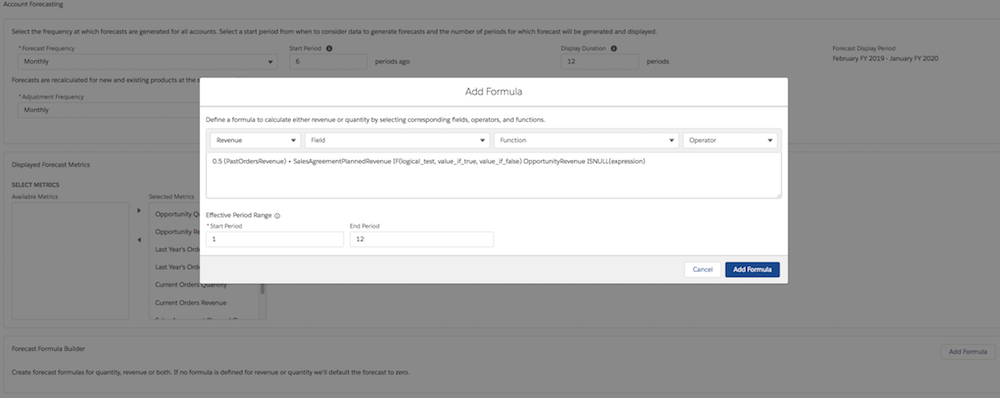
7. Click **Add Formula**.
Based on the forecast display duration, you can create either a single formula for all periods, or multiple formulas for different period ranges. If the forecast display period is 12 months, you can create up to 12 formulas.
#### See Also
- [Configure Forecast Generation and Display Settings](https://help.salesforce.com/s/articleView?id=ind.af_admin_displaysetting_task.htm&release=264.0.0&type=5 "Set up the forecast display settings on the Account Forecasting page in Setup. You can define the start period, forecast frequency, and the display duration for rolling forecasts. The forecast display rolls over and adds another period every month or quarter, depending on the selected forecast frequency. This rolling forecast capability ensures that you forecast as many months ahead as in the display duration.")