
Enable contact center agents to set up service appointments in the Contact Center. In Lightning App Builder, create tabs for the Healthcare Appointment Scheduler component.
Required Editions
|
Available in: Lightning Experience Available in: Enterprise and Unlimited Editions with Health Cloud |
| User Permissions Needed | |
|---|---|
| To use the Contact Center for Health Cloud | Contact Center for Health Cloud permission set |
Reminder: Add the Service Appointments related list to the page layout when you configure the Person Account page layout for the Contact Center.
- From the App Launcher, find and select Contact Center.
- Go to Accounts and select a person account record to open in the Contact Center.
- Click the Gear icon, and then click Edit Page.
- In the Lightning App Builder, select the person account’s tab section.
- In the properties pane, click Add Tab.
-
Click the new tab, labeled Details, then click
 and select Custom.
- Add a name for your tab. For example, Appointments.
- Click Done.
-
Select the newly created tab, and move the Healthcare Appointment Scheduler component onto
the editable part of the tab.
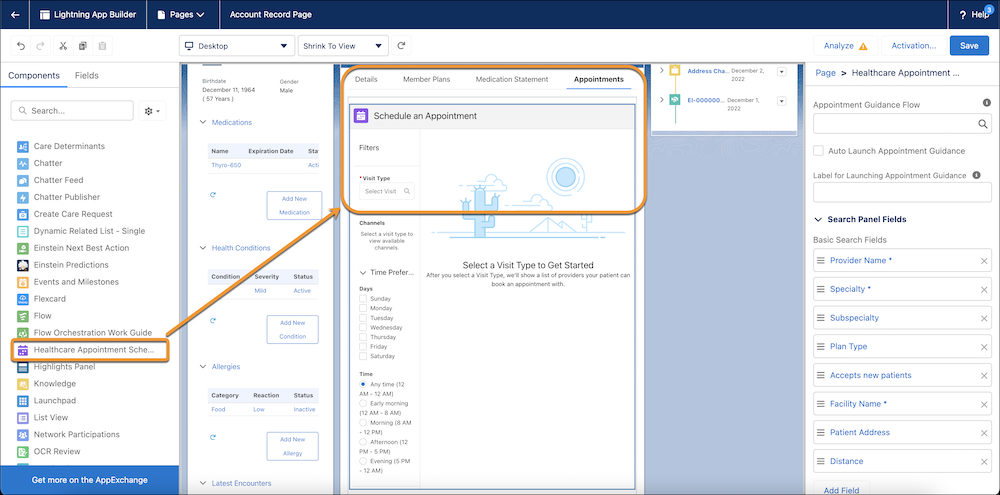
- Review the fields and remove any fields you don’t want to display on the Appointment tab.
-
Repeat the prior steps to add a Care Barrier tab and move the Care Determinants component
to the tab.
You don’t need to add Care Determinants as a related list in the Person Account page layout.
- Save your changes, click Activate, and then set the page as the app default for the Contact Center app.