---
schema_version: "1"
id: 9a65dd08c65b2e4b08621ad129d8c899e75607af55b2265a22ef8a8e88f5b6f4
title: Configure the Service Appointment Tab for the Contact Center
collection: admin
version: current
locale: en-us
portal_url: https://docs.salesforce.com/admin/current/en-us/ind/264-0-0/admin_contact_center_configure_the_service_appointment_tab.md
canonical_url: https://help.salesforce.com/s/articleView?id=ind.admin_contact_center_configure_the_service_appointment_tab.htm&release=264.0.0&type=5
source_site: help.salesforce.com
content_type: documentation
content_hash: 4a90f2804ae855ed8c5e616e8dc7ec041793dc183fb6fde38e3b18d940edfc91
description: Enable contact center agents to set up service appointments in the Contact Center. In Lightning App Builder, create tabs for the Healthcare Appointment Scheduler component.
products:
- Health
release: "264"
---
# Configure the Service Appointment Tab for the Contact Center
Enable contact center agents to set up service appointments in the Contact Center. In Lightning App Builder, create tabs for the Healthcare Appointment Scheduler component.
### Required Editions
Available in: Lightning Experience
Available in: Enterprise and Unlimited Editions with Health
Cloud
User Permissions Needed
To use the Contact Center for Health Cloud
Contact Center for Health Cloud permission set
Reminder: Add the Service Appointments related list to the page layout when you configure the Person Account page layout for the Contact Center.
1. From the App Launcher, find and select **Contact Center**.
2. Go to Accounts and select a person account record to open in the Contact Center.
3. Click the Gear icon, and then click **Edit Page**.
4. In the Lightning App Builder, select the person account’s tab section.
5. In the properties pane, click **Add Tab**.
6. Click the new tab, labeled Details, then click  and select **Custom**.
7. Add a name for your tab. For example, Appointments.
8. Click **Done**.
9. Select the newly created tab, and move the Healthcare Appointment Scheduler component onto the editable part of the tab.
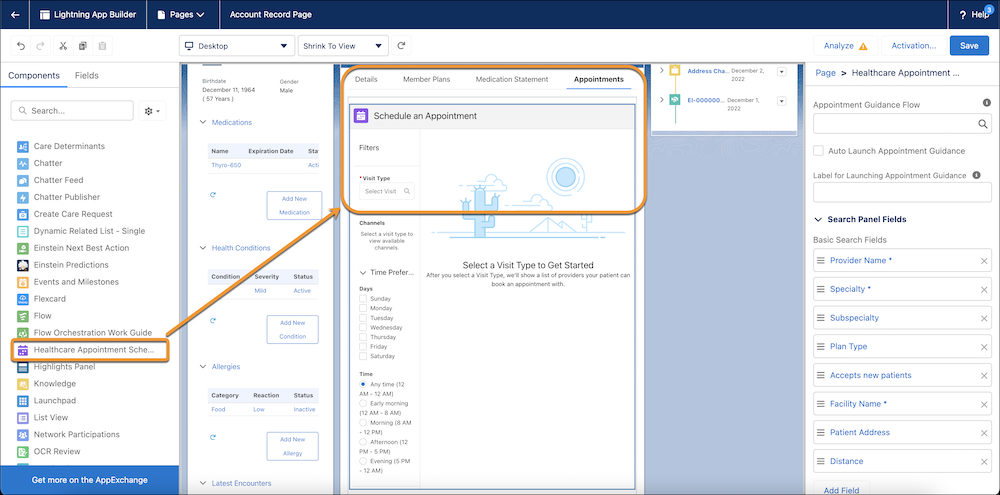
10. Review the fields and remove any fields you don’t want to display on the Appointment tab.
11. Repeat the prior steps to add a Care Barrier tab and move the Care Determinants component to the tab.
You don’t need to add Care Determinants as a related list in the Person Account page layout.
12. Save your changes, click **Activate**, and then set the page as the app default for the Contact Center app.
#### See Also
- [_Salesforce Help_: Add the Care Determinants Component to a Record Page](https://help.salesforce.com/s/articleView?id=ind.admin_component_care_determinants.htm&type=5&language=en_US)