
Enable Opportunity Product Schedules to forecast calculations based on opportunity quantity and revenue schedules.
Required Editions

Note
There’s a newer version of forecasting available called Advanced Account Forecasting. To learn about how the features are different, review this comparison. For new implementations, use Advanced Account Forecasting. For existing implementations, plan your migration.
| Available in: Lightning Experience |
| Available in: Enterprise, Unlimited, and Developer Editions |
| User Permissions Needed | |
|---|---|
| To modify forecast settings: | Customize Application |

Important Enable Product Schedules in your Salesforce org before enabling
Opportunity Product Schedules. Enable quantity scheduling and revenue scheduling for
products.
- From Setup, in the Quick Find box, enter Manufacturing, and then select Account Forecasting.
-
In the Account Forecast Calculation Settings section, enable Opportunity Product
Schedules.
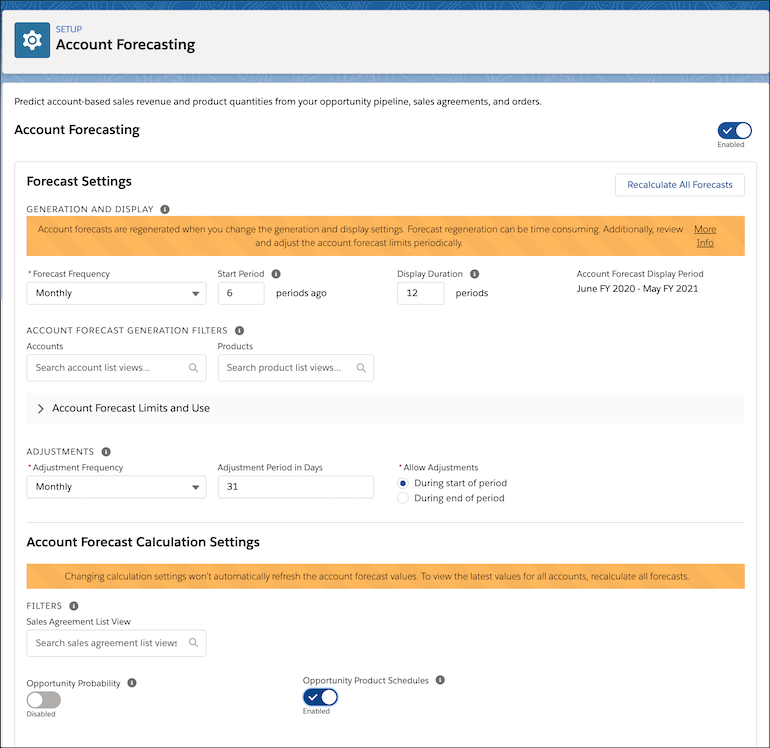
- Save your changes.
To view the latest account forecast values after enabling Opportunity Product Schedules, click Recalculate All Forecasts. You can also ask your users to recalculate each account’s forecast individually.