---
schema_version: "1"
id: c0e95c806c147ea50b883ded80a3ab410b35c748e0b8bd892d589b56f694b067
title: Use Opportunity Product Schedules to Calculate Account Forecasts
collection: admin
version: current
locale: en-us
portal_url: https://docs.salesforce.com/admin/current/en-us/ind/264-0-0/admin_account_forecasting_enable_opportunity_schedules.md
canonical_url: https://help.salesforce.com/s/articleView?id=ind.admin_account_forecasting_enable_opportunity_schedules.htm&release=264.0.0&type=5
source_site: help.salesforce.com
content_type: documentation
content_hash: ae99bd1d75653a50831ad4a6d4b514d77b3a87b837a49ae0f33e3aae69fcca65
description: Enable Opportunity Product Schedules to forecast calculations based on opportunity quantity and revenue schedules.
products:
- Manufacturing
release: "264"
---
# Use Opportunity Product Schedules to Calculate Account Forecasts
Enable Opportunity Product Schedules to forecast calculations based on opportunity quantity and revenue schedules.
### Required Editions

Note
There’s a newer version of forecasting available called Advanced Account Forecasting. To learn about how the features are different, review this [comparison](https://help.salesforce.com/s/articleView?id=ind.aaf_admin_comparison_pictoral_concept.htm&release=264.0.0&type=5 "Compare Account Forecasting and Advanced Account Forecasting to make an informed decision about the feature you want to use for account forecast calculations in your org. We recommend that you enable only one of these features in your org based on your decision."). For new implementations, use [Advanced Account Forecasting](https://help.salesforce.com/s/articleView?id=ind.aaf_admin_parent_concept.htm&release=264.0.0&type=5 "Generate comprehensive, multi-horizon forecasts for sales, operations, inventory, service, and other aspects of your business. Tailor your forecasting configurations to your objectives to generate accurate, relevant forecasts. Generate forecasts based on the data sources of your choice, such as opportunities, orders, and sales agreements, and define sophisticated calculation logic. Help different teams collaborate on forecasts and fine-tune forecasts."). For existing implementations, plan your [migration](https://help.salesforce.com/s/articleView?id=ind.aaf_admin_migrate_af.htm&release=264.0.0&type=5 "You can use Advanced Account Forecasting to generate forecasts based on opportunities, orders, sales agreements, historical orders, and any other custom measures considering all aspects of business from Salesforce and beyond. If you’re an existing customer using Account Forecasting, follow these steps to migrate to Advanced Account Forecasting.").
Available in: Lightning Experience
Available in: Enterprise, Unlimited, and Developer Editions
User Permissions Needed
To modify forecast settings:
Customize Application

Important Enable Product Schedules in your Salesforce org before enabling Opportunity Product Schedules. Enable quantity scheduling and revenue scheduling for products.
1. From Setup, in the Quick Find box, enter Manufacturing, and then select **Account Forecasting**.
2. In the Account Forecast Calculation Settings section, enable Opportunity Product Schedules.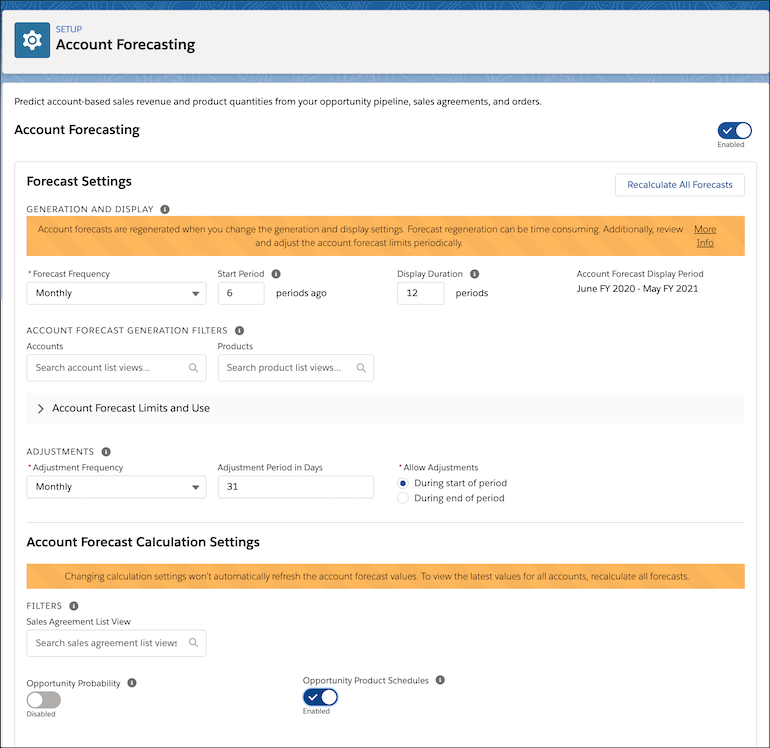
3. Save your changes.
To view the latest account forecast values after enabling Opportunity Product Schedules, click **Recalculate All Forecasts**. You can also ask your users to recalculate each account’s forecast individually.