
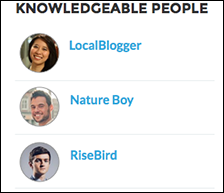
Highlight topic experts so the site can direct questions straight to them. The Knowledgeable People component displays up to five experts, chosen based on factors such as best answers, mentions, or likes on questions and posts.
In the Page Editor, you can configure the Knowledgeable People component on Topic View pages.
- Select the Knowledgeable People component.
-
In the property editor, configure the properties for the component.
Property Details Title Enter a title for the component. The default text is Knowledgeable People. Topic ID The default entry, {!topicId}, displays unique knowledgeable users for each topic. To instead display knowledgeable users based on a specific topic, enter the topic ID.

Example
For sites created in Spring ‘15 or earlier, complete these steps to add the Knowledgeable People component:
- From the site, click
 in the global header.
 - Click , and select Enable knowledgeable people on topics.
- Click , and go to Site.com Studio.
- In the Site Pages section, double-click the main page.
- In the Views tab at left, double-click Customer Service Topic View.
- Click the Page Elements tab
 , and search for the Knowledgeable People
component.
, and search for the Knowledgeable People
component. - Right-click the component, and place it in the
div.cSecondaryContentsection.