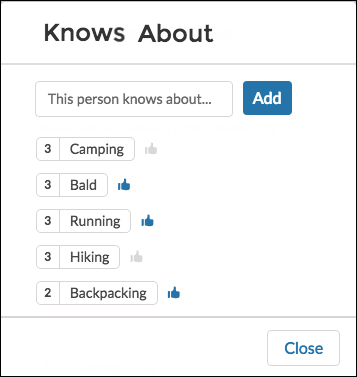
Allow site members to endorse and recognize experts using the widget directly on a member’s profile page.
After you have enabled Knowledgeable People, site members can endorse one another for both new and existing topics on their site's user profile page. The profile page displays all the topics the site member is knowledgeable about.
Use the component to enter a new topic for endorsement. You can also view the number of endorsements that have been received for each topic that a member has been marked knowledgeable about. To add or remove endorsements, members can click the thumbs up button. Site members aren’t able to endorse themselves on any topic.
-
Do one of the following:
- To display the Knows About list within the User Profile component, select that component.
- To display the list elsewhere on the profile page, drag the User Profile Knows About component to the desired location.
-
In the property editor, configure the properties
for the component.
Property Details User ID The user profile ID. Typically, this field is automatically populated with the record ID when the page loads. Title Enter a title for the component. The default text is Knows About. Maximum Topics Displayed Enter the maximum number of topics listed for each user, up to a limit of 10.

Note Site members can’t opt out of being shown as knowledgeable about specific
topics.

Example