Add the CMS Single Item (Detail) component to a CMS Content page to configure the
page and let users see your content in full. Use this component to customize the content and
layout of detail pages for all CMS content types: News, Image, and Document.
Required Editions
| Available in: Salesforce Classic and Lightning Experience |
| Available in: Enterprise, Performance, Unlimited,
and Developer Editions |
| Applies to: Aura sites |
You can only add the CMS Single Item (Detail) to a CMS content detail page in
Experience Builder. There’s only one detail page for each content type in Salesforce
CMS.
-
In Experience Builder, navigate to a detail page, and then click
Components.
-
Drag the CMS Single Item (Detail) component onto the
page.
-
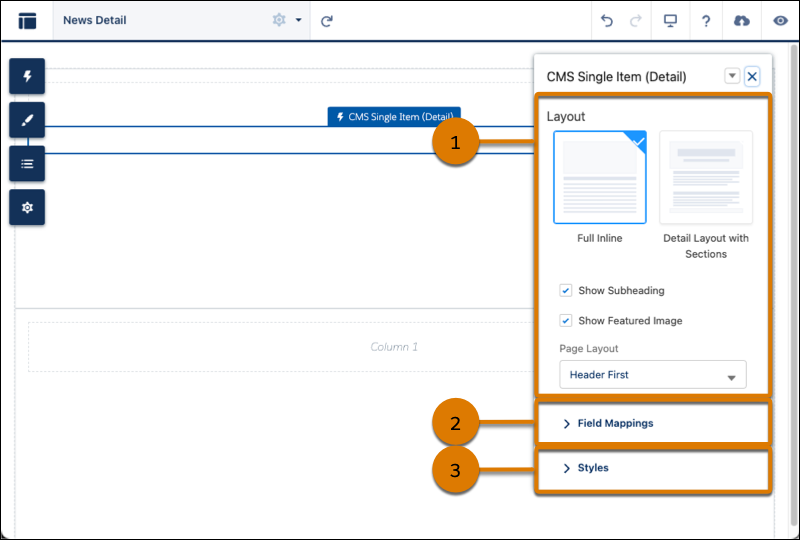
In the component property panel, determine the content layout (1), map fields
to fields in the CMS content (2), and customize the layout of images and headers
(3).
Show content fields in a default order, or group them into sections for a
more precise layout. To fully customize the appearance of your CMS content
detail page, continue adjusting the fields in the component property
panel.