
Add a single item of Salesforce CMS content such as a corporate statement, article, or image to your Aura site using the CMS Single Item component. You can add any content type, including News, Image, or Document, as a single item to a page.
Required Editions
| Available in: Salesforce Classic and Lightning Experience |
| Available in: Enterprise, Performance, Unlimited, and Developer Editions |
| Applies to: Aura sites |
| User Permissions Needed | |
|---|---|
| To create, customize, or publish an Experience Builder site: | Create and Set Up Experiences AND View Setup and Configuration |
Before using the CMS Single Item component, create content in Salesforce CMS. You can add the component to your site without a content source, but you can’t configure it until you link it to content.

Note You can only add published content created in the
Digital Experiences app. If you have a published piece of content and a draft
version of the content, the latest published version is what’s available to
select.
- In Experience Builder, click Components.
- Drag the CMS Single Item component onto the page.
- In the component property panel, click Add Content.
- Select the content that you want to add from the list of published CMS content items, and save your change.
- In the component property panel, customize the content layout, such as font size, image position, overlays, and more.
-
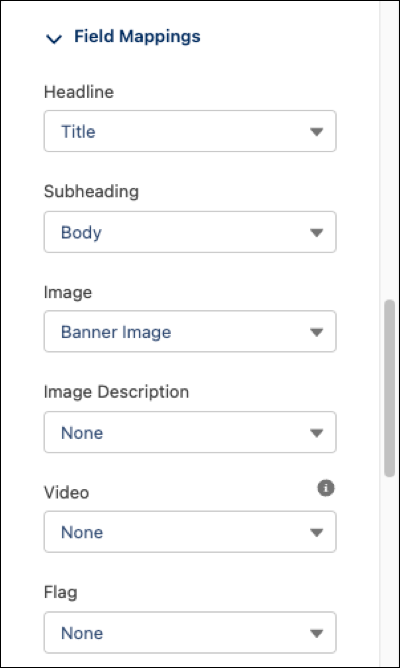
To control what information the component displays, select field mappings in
the component property panel. Map component fields to properties of the
Salesforce CMS content.
Your changes are saved as you make selections, and they’re reflected in the preview.For example, map the Headline to the content title, and map the Subheading to the content body. Setting field mappings also makes your content more accessible to site visitors who use screen readers.
 Note When you publish or unpublish content that is bound to a CMS Single Item, your guest users can experience up to an hour delay before they see the updated content in your site. Authenticated users can experience up to a five-minute delay.