
With Campaign Marketplace, you can provide the structure and guidance necessary for partners to successfully execute campaigns. Channel marketers can create and share marketing campaigns, guidelines, and assets with partners. Partners can then choose which campaigns work best for them.
Configure Campaign Marketplace to display pre-approved campaigns for partners. This feature is available in Lightning Experiences and Lightning Bolt solutions.
- Select the Campaign Marketplace component in the page you're configuring.
-
In the property editor, configure the properties for the component.
Property Details List View Name This field looks up to the list view of campaigns created by the admin. Sort By This field establishes how campaign tiles are categorized. Sort Order This field establishes the order that campaign tiles appear in. Header Label The label that appears at the top of the campaign marketplace. Show Image Displays the Image field on a campaign. Highlight Designates the field to highlight in the campaign marketplace. Highlight Color Designates the color to highlight your campaigns with. Category Field This field appears at the top of each campaign tile. Add a category field to callout important information about a campaign. Title Field The title of the campaign. Body Field Information displayed in the body of the campaign tile. Data Fields Add data fields to call out additional important information about a campaign. The data fields appear at the bottom of the campaign tile.

Example Organize marketing campaigns with the Campaign Marketplace.
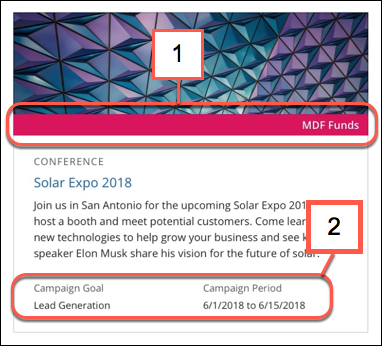
Add 1) highlights and 2) data fields to call out additional information about a campaign.