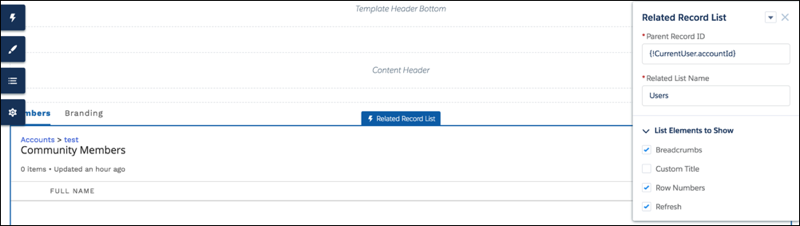
Channel managers can delegate partner users to help manage accounts. Using the Members tab, delegated account managers can activate and deactivate accounts and reset a member’s password. They can also manage branding assets that channel managers can use to create co-branded emails, marketing campaigns, and websites.
Partner users who have been granted delegated external user administration rights can access Account Management from their Experience Cloud site. From Account Management, they can manage members of their partner account from the Members tab.
Partner users who have been granted delegated external user administration can create and edit account brands from the Branding tab.

Note Add the Account Brand and Members
related lists to the Account page layout, so partners can
access member and brand information.
- Select the Account Management component in the page you’re configuring.
- Click the tab that you want to configure.
-
To view the component properties, select the Properties pane:
Property Details Parent Record ID {!CurrentUser.accountId} Related List Name Name of the related list displayed. List Elements to Show - Breadcrumbs
- Custom Title
- Row Numbers
- Refresh
Account Id {!CurrentUser.accountId}

Example Account Management component in Experience Builder