
Use the Digital Experiences App to create, manage, and publish engaging content for your Experience Builder site. Then display your Salesforce CMS content on your Aura or LWR site using Experience Builder tools. When you use Experience Builder sites together with Salesforce CMS, you can keep your brand and content consistent everywhere the content is published.
Required Editions
| Available in: Salesforce Classic and Lightning Experience |
| Available in: Enterprise, Performance, Unlimited, and Developer Editions |
| Applies to: LWR and Aura sites |
Experience Builder and site templates help you create, brand, and publish a custom site. You can choose from several templates, all of which come with components that you can use to add CMS content to your Aura and LWR site pages.
Salesforce CMS is a hybrid content management system where you can create, manage, and publish content from CMS workspaces to multiple channels, including Experience Builder sites.
You can access your sites and Salesforce CMS workspaces from the Digital Experiences app, which is available through the App Launcher. View and manage your CMS workspaces and your Aura or LWR sites right from the Digital Experiences Home tab.
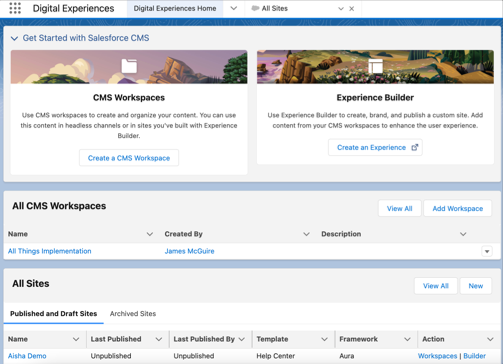

Before you can use Salesforce CMS content on your Experience Builder site, ensure that your site is based on the most up-to-date Lightning template.
Connect Salesforce CMS to your Experience Builder site by adding the site as a channel to your Salesforce CMS workspace. Next, ensure that all content that you want to display on your site is published in your workspace. Content must be published before you can use it on your Aura or LWR sites.

Already have a CMS? You can use content from another CMS in your Experience Builder site for consistent branding, reuse of material, and ease of maintenance. See Connect Your External CMS to Your Experience Builder Site in CMS Developer Guide to learn more.
- Display Salesforce CMS Content in Your LWR Site
Create content in Salesforce CMS that matches your branding and messaging, and then use the content on any Lightning Web Runtime (LWR) site. Dynamically display Salesforce CMS content in your LWR site with data binding components in Experience Builder. You can nest one component within another, add unique images, and create engaging pages with CMS content. - Display Salesforce CMS Content in Your Aura Site
Deliver and organize CMS content with Experience Builder and Content Management. Use Experience Builder to configure the content formatting and layout on your site pages. And use Content Management to organize your CMS content into collections and topics.