Customize the Chatter publisher with payloads that are unique to your business process.
Add a form to a post; choose from a selection of branding images; add inspiration to your feed
with profound quotations. Select from the custom apps your team creates or acquires from
AppExchange. Add up to five apps to the Chatter publisher.
Required Editions
| Available in: Salesforce Classic and Lightning Experience |
| Available in: Enterprise, Performance, Unlimited,
and Developer Editions |
| Applies to: Aura and Visualforce sites |
| User Permissions
Needed |
| To add Rich Publisher Apps to the Chatter publisher: |
Chatter Enabled
AND
Create and Set Up Experiences
|
-
Go to Experience Workspaces.
-
Click .
-
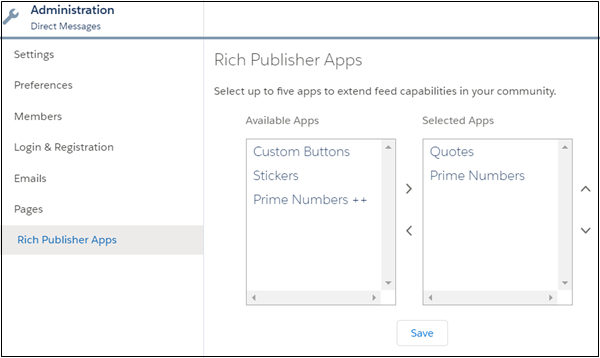
Move apps between the Available Apps and Selected Apps lists.
-
Rearrange the Selected Apps list in the order you want the apps’ icons to appear in the
Chatter publisher.
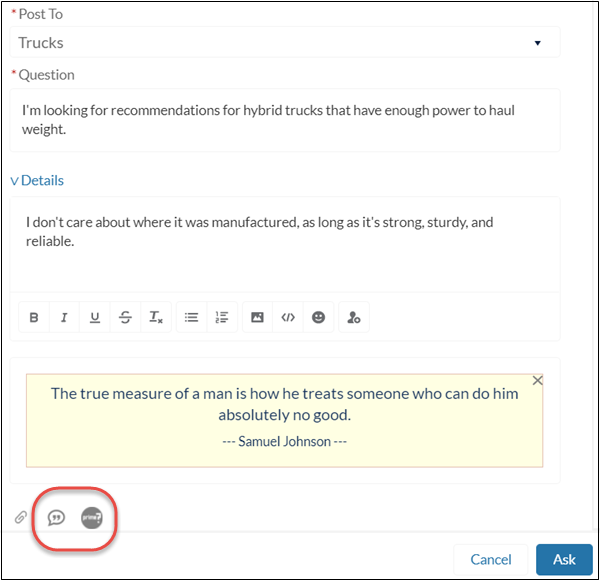
Selected apps appear to the right of the Attach icon in the Chatter publisher.
The apps appear in the order you arranged them in the Selected Apps column.