
Edit manual CMS Collections in Content Management to keep the content in your Aura site up to date.
Required Editions
| Available in: Salesforce Classic and Lightning Experience |
| Available in: Enterprise, Performance, Unlimited, and Developer Editions |
| Applies to: Aura sites |
| User Permissions Needed | |
|---|---|
| To access Experience Workspaces or Experience Builder: |
Create and Set Up Experiences AND Is a member of the community, portal, or site |
| To customize an Experience Builder site: |
|
| To create collections using CMS content: |
|
- In Content Management, go to the Collections tab.
- Select the collection that you want to edit.
- To view more details about the content such as the content body or slug, click the content title (1).
- To change the title or to add or remove content from the collection, click Edit (2).
-
To change the order of how the content appears on your site, move items up or down in the
list (3).
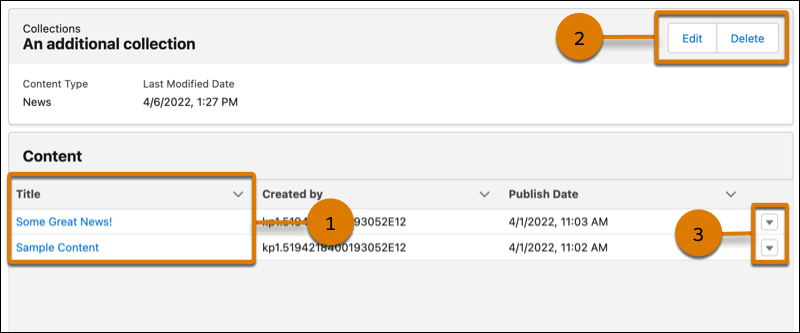
If you want to delete the Collection, click Delete.