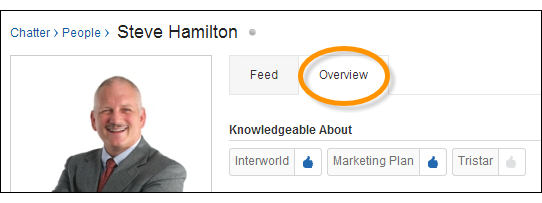
Discover experts and recognize them in Chatter using the Knowledgeable People section of topic pages and the Overview tab of user profile pages.
| Available in: Salesforce Classic |
| Available in: Group, Enterprise, Professional, Performance, Unlimited, Contact Manager, and Developer Editions |
The topic page shows the five people who are most knowledgeable about the topic. Ranking is based on their activity on the topic and the recognition they’ve received for the topic. For example, Chatter considers how often people:
- Are mentioned in posts or in comments on posts with the topic
- Receive likes on comments on posts with the topic
- Receive endorsements for the topic
Endorsements are a strong signal of knowledge, so if someone endorses you, you’re automatically included on the list of knowledgeable people.

Note Knowledgeable people are calculated and updated once a day.
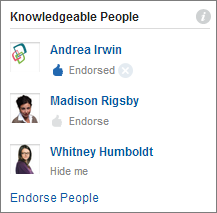
To change endorsements:
- Endorse someone you think is knowledgeable about a topic by clicking Endorse under the person’s name. If the person you want to endorse doesn’t appear in the Knowledgeable People section, click Endorse People. Endorse People shows the full list, which you can search. (You can’t endorse Chatter Free users, customers, or yourself.)
- Remove your endorsement of someone at any time by clicking
 next to Endorsed under the person’s name. Removing
your endorsement of someone doesn’t necessarily remove them from the
knowledgeable people list. Other people can still endorse them, or they could
already have significant activity on the topic.
next to Endorsed under the person’s name. Removing
your endorsement of someone doesn’t necessarily remove them from the
knowledgeable people list. Other people can still endorse them, or they could
already have significant activity on the topic.
To remove yourself from the knowledgeable people list:
- Opt out by clicking Hide me under your name. No one can see you on the list after you hide yourself. If you change your mind, you can opt in again by clicking Endorse People and then Show me next to your name.
To see a person’s full range of expertise:
- Navigate to their user profile page, and click the Overview tab.
- To see topic detail pages, click a topic name.
- To add or remove your endorsements, click the thumbs-up icon.