
Customize your personal Chatter profile. Add a photo and information about yourself so others can learn more about you.
Required Editions
| Available in: Salesforce Classic and Lightning Experience |
| Available in: Group, Essentials, Professional, Enterprise, Performance, Unlimited, Developer, and Contact Manager Editions |
Click your name anywhere in Salesforce to view your profile. If available, you can also click the Profile tab or Your Name | My Profile at the top of the page. In Lightning Experience, click Your Name, and then click Your Name again in the dialog. View other people's profiles by clicking their name.
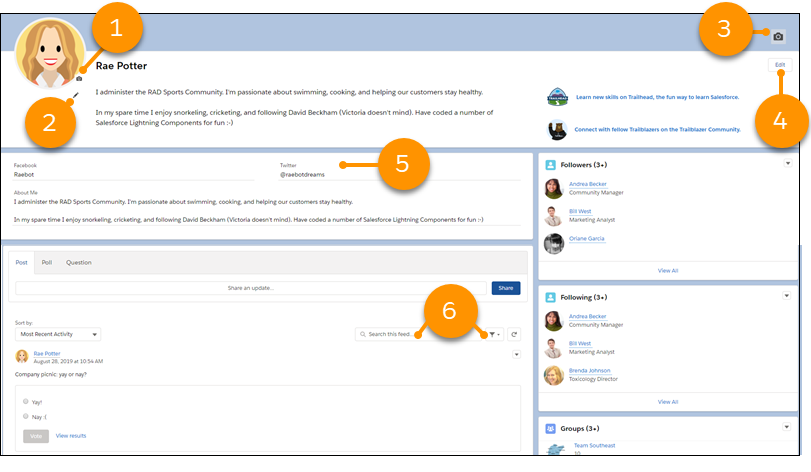
From this page you can:
- Change your profile picture. (1)
- Edit your About Me statement by clicking the pencil icon under your profile image. (2)
- Edit your page banner. (3)
- Edit your personal statement. (4)
- Add links to your social media accounts. (5)
- Search and filter your profile feed. (6)