As a moderator, you can assign moderator privileges to Chatter Free users in your
organization. If needed, you can also remove moderator privileges.
Required Editions
| Available in: both Salesforce Classic and Lightning Experience |
| Available in: Essentials, Group, Enterprise,
Professional, Performance, Unlimited,
Contact Manager, and Developer Editions
|
| User Permissions
Needed |
| To assign moderator privileges to Chatter Free users: |
Moderate Chatter |
-
To go to the person's profile page, click their name in the People tab or on a
feed.
-
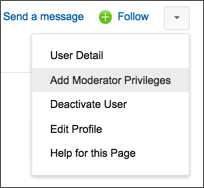
On the profile page, the user action menu provides options for adding or removing moderator
privileges and deactivating a user.
- If you want the person to be a moderator, select Add
Moderator Privileges.
- If the person is a moderator and you want to revoke those privileges,
select Remove Moderator Privileges.