
Attach up to 10 files to a Chatter post. View multiple file previews in the Chatter feed.
Required Editions
| Available in: Lightning Experience and Experience Builder sites |
| Available in: Essentials, Group, Professional,Enterprise, Performance, Unlimited, Contact Manager, and Developer Editions |
Add up to 10 files to one Chatter post in Lightning Experience and Experience Builder sites.

Note On comments, you can attach only one file.
-
In the Chatter publisher, click in the Share an Update field to expose the Attach
icon.
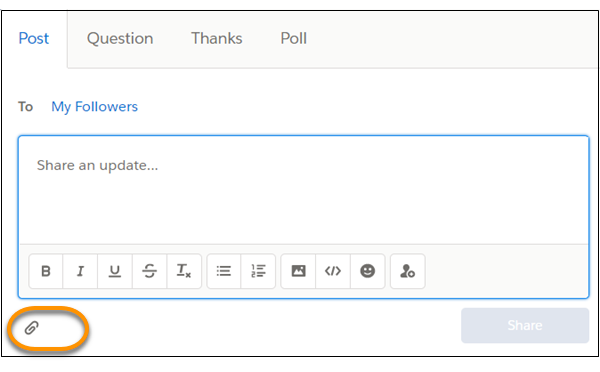
-
Click
 the
Attach icon to open the Select Files dialog.
the
Attach icon to open the Select Files dialog.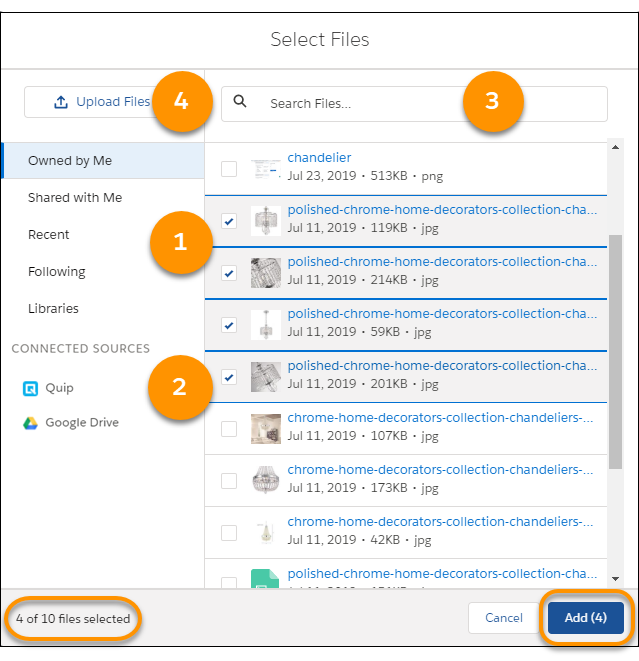
-
You have some options for choosing up to 10 files.
- Select a category, and browse its related files (1).
- Select a content source, and browse its related files (2).
- Search for the file by its file name (3).
- Click Upload Files, and browse your local drive for files (4).
At the bottom of the dialog, there’s a count of selected files. The Add button also shows the current total.
- When you finish your selection, click Add.