
Read a Chatter post that you want to follow up on? In Salesforce Classic, use the Create New Task action to create a task directly from the post.
You can create a task from anyone’s post, including posts with attachments. You can’t create a task from a system-generated post, like a record update.
-
Click the post’s overflow menu
 .
.
-
Select Create New Task.
If you don’t see the Create New Task action, ask your Salesforce administrator to enable this action for your organization.
- In the Create New Task dialog, add a subject and a due date. If applicable, associate the task with a contact or lead and an object, like an account. Use the search boxes to find available contacts, leads, and objects.
- When you’re done, click Create.
The task is assigned to you and posted to your profile feed. The task also appears in the My Tasks section on your Home tab.
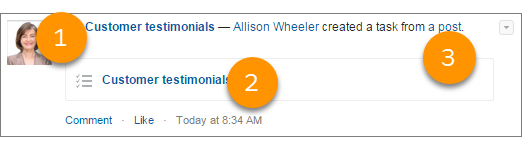
Click the task subject link (1 or 2) to open the task. Click the post link (3) to navigate to the post where the task was created.