
In Salesforce Classic, add a Chatter feed search as a favorite to access feed updates quickly without leaving the Chatter tab.
Required Editions
| Available in: Salesforce Classic |
| Available in: Group, Enterprise, Professional, Performance, Unlimited, Contact Manager, and Developer Editions |
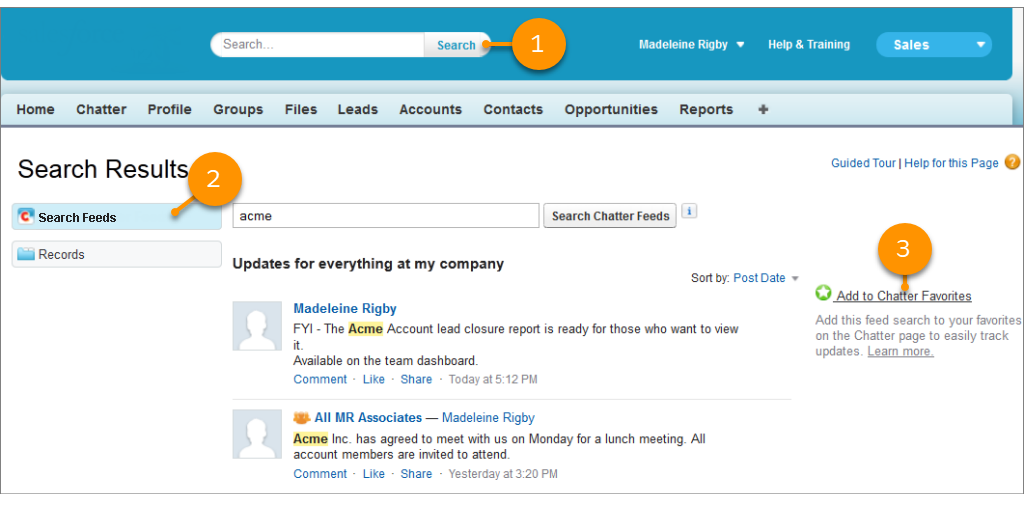
- Enter terms in the header search box, and click Search.
- To see the posts and comments that include your search terms, click Search Feeds.
- Click Add to Favorites.

Example
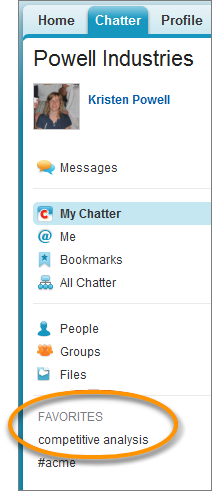

Here’s a favorite search on the terms competitive analysis.
The favorite name on the Chatter page is the same as the search terms that you entered.
Tip You can save a search for a Chatter group name as a favorite for quick access
the group feed from the Chatter page. Similarly, you can save a search for a person's name
as a favorite for quick access to that person's posts, comments, and mentions.